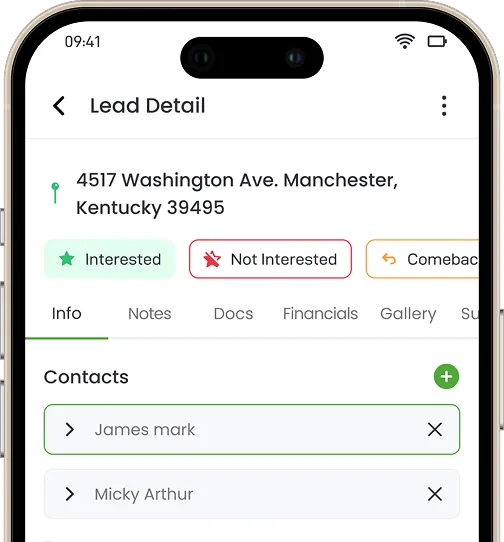
Small field service teams lose time and money when sales, scheduling, jobs, and payments live in separate tools. This guide compares 10 field service management software options for small businesses, covering strengths, limits, and best fit for each. Knockio leads for small teams because it connects canvassing, CRM, scheduling, estimates, work orders, and payments on one job record, with monthly billing, no setup fee, no long term contract, and the option to buy just canvassing or just the field service CRM. The right choice depends on whether your team creates the work or only completes it.
Summarize with:
Summary:
If you run a small service business, you already know the real cost of the wrong software: a tech standing on the wrong driveway, an invoice that never gets sent, a lead that dies in someone’s inbox. The right field service software for small business isn’t the one with the longest feature list, it’s the one that matches how your team actually creates and completes work.
We tested and researched 10 platforms against three things every small operator actually cares about: time saved per job, cash flow speed, and how fast a new hire can use it without training. Here’s the breakdown, starting with the numbers.
Quick Comparison: Best Field Service Management Software for Small Business
| Software | Price | Best For | Key Differentiator |
|---|---|---|---|
| Knockio | Modular, monthly, no setup fee | Teams that sell and service the work | Only platform connecting D2D canvassing to the field service CRM on one job record |
| Jobber | Tiered monthly plans | Home service teams wanting simplicity | Clean, low-training-curve scheduling and invoicing |
| Housecall Pro | Tiered monthly plans | HVAC, plumbing, repair shops | Built-in marketing and review automation |
| Arrivy | Tiered monthly plans | Route- and ETA-sensitive businesses | Live routing and arrival tracking layer |
| ServiceTitan | Custom / enterprise pricing | Large or fast-scaling operations | Deep reporting and inventory management |
| Contractor+ | Free plan; paid from $29/user/mo (annual) | Solo operators, tight budgets | Mobile-first, 30+ trades supported |
| FieldPulse | Tiered monthly plans | Growing contractors | Simple, modern interface for office + field |
| ServiceFusion | Tiered monthly plans | Established SMBs wanting stability | Long-standing accounting integrations |
| Workiz | Tiered monthly plans | Dispatch-heavy, high call volume teams | Native call tracking tied to job records |
| Zuper | Tiered monthly plans | Structured teams planning to scale | Enterprise-grade workflow structure |
Pricing for competitors varies by plan tier and user count; contact vendors directly for current quotes. Knockio pricing is available at knockio.com/pricing.
Our Methodology
This ranking is built by Knockio’s content and product team, who work daily with field sales and service operators like plumbers, roofers, HVAC techs, solar and security dealers, running these exact workflows. We evaluated each platform against real operational pain points (mobile reliability, usability, CRM-to-scheduling handoff, and total cost to start) rather than marketing copy alone.
Why Most “Best FSM Software” Lists Get It Wrong
Most roundups rank tools by feature count. That’s the wrong lens for a small business owner. You don’t need more features; you need fewer gaps between the moment a job is sold and the moment you get paid for it.
The tools on this list fall into two buckets:
- Service-only platforms: great once a customer calls you, but blind to how the job got created.
- Sales-and-service platforms: track the work from first contact through final payment.
Which bucket you need depends on one question: do your people go out and create new work, or only complete jobs that are already booked?
1. Knockio – Best Overall for Sales + Service Teams
 Best for: Small and large teams alike that both sell the work and deliver it.
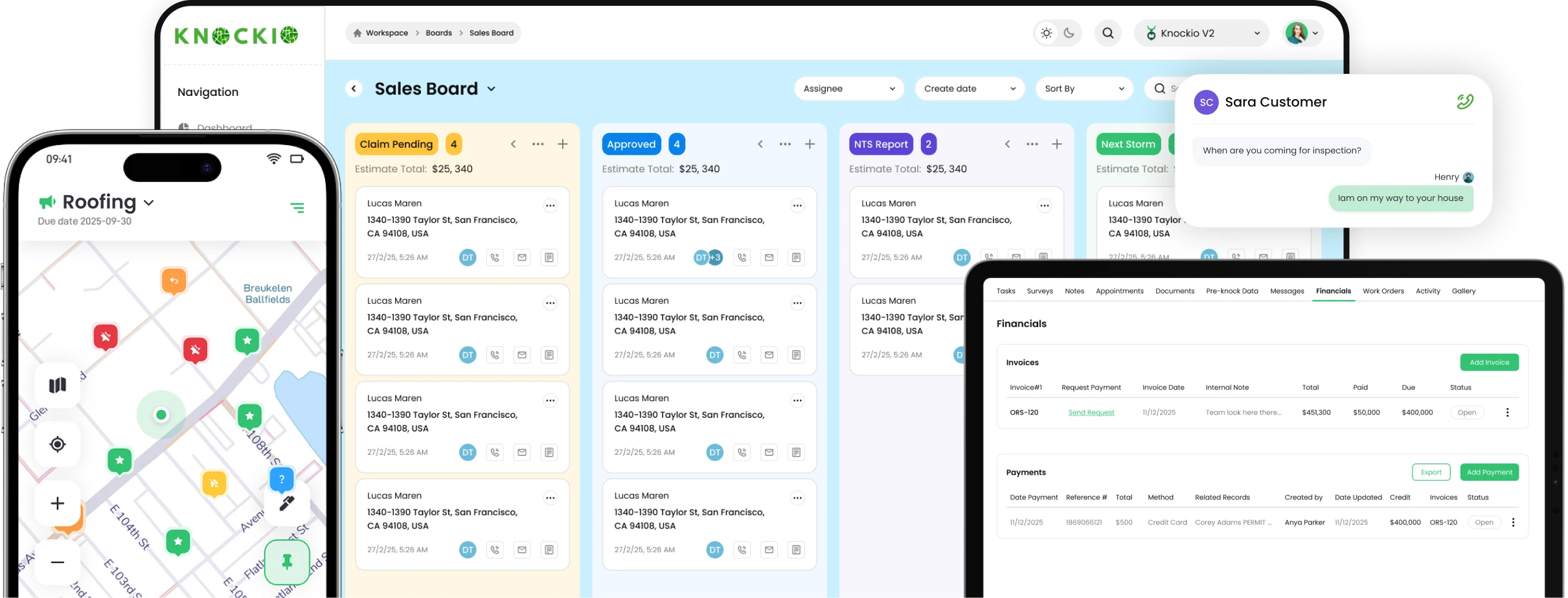
Knockio is a field service management platform + mobile field service app that connects canvassing, customer records, scheduling, dispatching, territories, jobs, estimates, work orders, invoices, payments, and field activity in one system. It isn’t a small-business-only tool; larger organizations run entire departments on it, but its pricing and packaging make it unusually accessible for a small crew starting out.
Why it works even for a two-person crew, and why bigger teams don’t outgrow it:
- Modular pricing. Buy just the door-to-door canvassing tool, just the field service CRM, or both once sales and service need to talk to each other. Most small businesses grow in exactly that order, and few competitors let you pay in that order.
- No setup fee, monthly billing, no long-term contract. Start with a single user; volume discounts kick in automatically at five or more.
- Real human support. With no IT department and one office manager, a slow support reply costs you a full day of scheduling. Support at Knockio is part of the product, not a ticket queue after onboarding ends.
What makes it different: every job in Knockio carries its full history – customer info, notes, photos, estimates, invoices, payments, and activity log – on one record. Teams build their own job statuses and boards (Sales, Production, Collections), then view the pipeline as a list, map, or board. A manager can see why a sold job never reached production in seconds, not after three phone calls.
Estimates support templates, digital signatures, and change orders, so a rep can close and get a signature at the kitchen table. Sold work becomes a work order with tasks, materials, and vendor bills attached. Payments come in through text-to-pay, tap-to-pay, card, or ACH, and the job record updates automatically.
Where it fits best: If your reps go out and create new work, not just complete what’s already on the calendar, Knockio is the field sales and service CRM integration most small teams are missing. For most teams, it replaces five to ten disconnected tools with one.
2. Jobber – Best for Simple, Repeat-Visit Service Businesses
Best for: Home service teams that want something simple and steady, but not much sales tracking.
Jobber earned its following with lawn care, cleaning, and repeat-service companies because it stays lightweight. No hundred-feature learning curve. Core strengths:
- Customer records and a clear scheduling calendar
- Online booking for customers
- Automatic reminders, estimates, and invoices
- Simple performance reports
Why this works for repeat-visit trades but fails for teams that sell door-to-door: Jobber assumes the job is already booked. It has no built-in canvassing, territory tracking, or way to capture a lead before it becomes an appointment. For a tight crew of five to ten that just wants the day to run without drama, that’s fine. For a team generating its own leads in the field, it’s a gap.
Knockio vs. Jobber: Why Switch? Jobber keeps a booked schedule tidy – Knockio adds the part that fills it, with canvassing, territories, and rep tracking feeding the same job record as the estimate and invoice. see how Knockio fills the schedule, not just books it →
3. Housecall Pro – Best for HVAC, Plumbing & Repair Shops
Best for: HVAC, plumbing, and repair companies that need scheduling and payments to just work.
Housecall Pro sits comfortably between simple and organized. The dispatch board is easy to read, techs check job details from their phones, and customers book online without tying up the office line. Strengths include:
- Real-time scheduling and tech location tracking
- Invoicing and payment collection
- Customer messaging
- Automatic review requests and follow-ups
Why this works for inbound repair calls but fails for outbound sales teams: as your team grows, pricing climbs and customization stays limited, and there’s still no way to track a canvassing rep working a neighborhood before that lead ever hits the schedule.
Knockio vs. Housecall Pro: Why Switch? Housecall Pro is strongest once a customer calls you. Knockio also covers going out and finding them, with door-to-door canvassing, territory assignment, and homeowner data attached to the job it becomes. compare Knockio for field service teams →
4. Arrivy – Best for Route- and ETA-Sensitive Businesses
Best for: Businesses where routes and arrival times matter most.
Arrivy plans efficient routes and tracks technicians live, so customers know almost exactly when you’ll arrive.
Why this works as an add-on layer but fails as a standalone system: Arrivy isn’t a full CRM – sales tracking and financial reporting are limited. It’s best paired with other tools, which means small businesses end up managing yet another integration.
Knockio vs. Arrivy: Why Switch? Arrivy is a layer you add to other tools. Knockio does routing and live field visibility inside the same system that holds the customer, estimate, work order, and payment. see Knockio’s routing + rep tracking →
5. ServiceTitan – Best for Large or Fast-Growing Operations
Best for: Large or fast-growing service companies that need serious depth.
ServiceTitan is a heavyweight: detailed financial tracking, inventory management, custom dashboards, deep integrations. It’s excellent software for real complexity.
Why this works for scaling enterprises but fails for a five-person crew: setup takes time, the learning curve is real, and cost runs well above most small-business platforms. If you’re getting started with a small crew, it’s often more than you need today.
Knockio vs. ServiceTitan: Why Switch? For a small team, the difference is what it costs to start. Knockio bills monthly with no setup fee and no long-term contract — and you can buy just canvassing or just the CRM instead of the whole platform. see Knockio without the enterprise price tag →
6. Contractor+ – Best for Solo Operators on a Budget
Best for: Solo operators and small crews watching every dollar.
Contractor+ is a mobile-first, all-in-one platform combining CRM, estimating, scheduling, dispatch, invoicing, and payments across 30+ trades. A free plan covers solo operators; paid plans start at $29/user/month, billed annually.
Why this works for a one-truck business but fails once you need to generate leads at scale: it handles jobs you already have well, but it has no canvassing, territory, or outside-sales layer, and the annual billing commitment is a real ask for a business still finding its footing.
Knockio vs. Contractor+: Why Switch? Contractor+ handles the jobs you already have. Knockio also covers finding them – canvassing, territories, and rep tracking feed the same job record as the estimate and invoice, and billing is monthly, not annual. see what Knockio includes from $20/mo →
7. FieldPulse – Best for Contractors Aiming for Steady Growth
Best for: Contractors who want order without enterprise complexity.
FieldPulse pulls CRM, scheduling, estimates, and invoicing into one modern interface. Office staff and field crews stay aligned because everything lives in one spot.
Why this works for booked-job workflows but fails for lead generation: like most of this list, FieldPulse is built around work that’s already on the calendar, there’s no built-in way to track the door-knocking or canvassing that created the job in the first place.
Knockio vs. FieldPulse: Why Switch? FieldPulse is built around work that’s already booked. Knockio covers the step before that, with canvassing, territory assignment, and rep tracking sitting in the same system as the job those visits turn into. walk through Knockio with our team →
8. ServiceFusion – Best for Established SMBs Wanting Stability
Best for: Established small businesses that value stability over flash.
ServiceFusion has been around for years and stays focused on scheduling, dispatch, and accounting integration. The interface feels dated, but it’s dependable.
Why this works for legacy operators but fails growth-focused teams: it assumes the work is already coming in. There’s no canvassing or lead-capture layer connecting the sales motion to the job record.
Knockio vs. ServiceFusion: Why Switch? Steady is good, but ServiceFusion assumes the work is already coming in. Knockio connects the selling side to the service side on one job record, from first contact to final invoice. put Knockio side by side →
9. Workiz – Best for Dispatch-Heavy Teams
Best for: Companies that live and die by dispatching – locksmiths, garage door companies, emergency repair.
Workiz is built for shops fielding constant urgent calls. A standout: built-in call tracking, tying recorded calls straight to customer profiles and jobs. Operational strengths:
- Live map of technicians and real-time status updates
- Call tracking and logging inside the system
- Payment processing and detailed reports
Why this works for emergency dispatch but fails for teams running a real sales pipeline: Workiz is fast at assigning and closing out jobs, but it isn’t built to manage a longer sales cycle – quoting, follow-up, multi-stage deals — the way a canvassing or outside-sales team needs.
Knockio vs. Workiz: Why Switch? Dispatch is one lane. Knockio runs the long pipeline too – from a knock or campaign through appointment, estimate, sold work, and payment on one record. see Knockio’s live GPS tracking →
10. Zuper – Best for Organized Teams Planning to Scale
Best for: Organized teams that like clear structure and plan to grow into it.
Zuper handles scheduling, dispatching, invoicing, and automation, and connects with accounting software. It feels enterprise-ready, but smaller teams can grow into it.
Why this works for structured service operations but fails sales-led teams: setup and customization take time, and like most tools here, Zuper structures the service side well without touching the canvassing or outside-sales motion that creates new work.
Knockio vs. Zuper: Why Switch? Zuper structures the service side well. Knockio structures both sides – canvassing, territories, and rep activity sit on the same pipeline as production and collections. see how Knockio scales with you →
Still Comparing Options? Here’s the Short Version.
Knockio’s pricing model is built differently: pay for what you need. Instead of buying an entire platform to get one feature, start with canvassing alone, the field service CRM alone, or both together, with monthly billing, no setup fee, and no long-term contract. It’s the modular approach small teams need before they know exactly what they’ll use at scale.
→ take a 2-minute tour of Knockio
How to Choose Software for Service Companies
Don’t pick the tool everyone’s talking about. Pick the one that matches how your business actually runs. Ask yourself:
- Do my people go into the field to create new work, or only complete jobs already booked?
- How much do I need strong customer and sales tracking?
- Does it matter to see where my techs are in real time?
- Do I need estimates, proposals, and e-contracts built in?
- Would automation actually save me time?
- What can I realistically spend, and does the price change after year one?
The handoff is where small companies lose money. A sold job has to move cleanly into scheduling, then a crew or work order, then an invoice. Tools that drop the baton between sales and production are where time and cash slip through the cracks.
One more thing worth checking before you commit: does the app work offline? Field reps and techs regularly lose signal in basements, rural routes, and new-build neighborhoods. Offline-capable service software that syncs once connection returns is the difference between a lost lead and a captured one.
Final Thoughts
There’s no single best platform for everyone – the right one depends on your business and what you need right now.
- If you juggle selling and service: Knockio keeps new work and active jobs on one record, at a price and commitment level a small team can absorb.
- If you want something simple and reliable: Jobber and Housecall Pro are steady choices.
- If your day runs on dispatch: Workiz keeps things moving fast.
- If you’re planning real growth: ServiceTitan and Zuper give you room to scale.
- If you’re a solo operator on a tight budget: Contractor+ covers the basics.
Match the system to your current stage, your growth goals, and how your team actually works.
If your business depends on reps bringing in jobs and crews delivering them, and you’re tired of stitching five or six tools together, see what one connected system feels like.

Waqar Hussain leads SEO and digital media at Knockio, a field sales and field service management (FSM) platform for businesses managing sales reps, field teams, jobs, and customer appointments. He focuses on content strategy, search growth, and digital media to help more teams discover better ways to manage leads, jobs, and field operations.