Summary:
Technician productivity problems are usually system problems, not people problems. A field service CRM removes the friction that slows techs down by putting full job history, clear steps, smart scheduling, and mobile documentation in one place. With Knockio, a job carries everything from customer details to notes, photos, statuses, work orders, and invoices, so teams stop chasing information and start finishing more jobs the right way.
Summarize with:
When people say “technician productivity,” most think it means working faster. It doesn’t. Rushing a job usually creates more problems than it solves. Real productivity is about doing the work the right way the first time. Fewer surprises. Fewer return trips. Fewer customers calling to complain.
Picture a tech who walks onto a site already knowing what happened last visit. They follow a clear process. They leave notes so complete that nobody from the office ever has to call and ask, “Hey, what did you do over there?” That is productivity.
Here is something a lot of home service owners don’t want to hear. Most productivity problems aren’t tech problems. They are system problems.
You can hire the hardest working, most skilled tech in your market. They will still bleed hours every week if they are stuck:
- Digging through old email threads to find job history.
- Driving back to the shop because a part was never listed.
- Sitting on hold with the office just to get one approval.
If your team is still bouncing between WhatsApp messages, paper work orders, and spreadsheets that nobody trusts, you feel busy all day without ever feeling efficient. There is a difference.
This is where a field service CRM earns its keep. It connects the whole job flow, from the first call to scheduling, dispatching, and completion. A normal CRM stores customer names. A field service CRM runs the actual work.
In this guide, we will break down how that works using real situations from the field. You will find a comparison chart to help you judge different platforms. And since we build Knockio for the home service industry, we will show you how a single connected system replaces the five to ten disconnected tools most teams are paying for right now.
Why technicians lose productive hours in the field
To fix productivity, you first have to find where time quietly disappears. It is rarely one big disaster. It is small leaks that happen every single day, on almost every job.
Most field teams lose time in the same five ways.
The “I wasn’t told that” moment. A tech walks in and the work order is missing the details that actually matter. They ask the customer, who says, “I explained all this on the phone.” Now the tech is calling the office, and someone there is digging through old notes. Thirty minutes gone. Customer already annoyed.
The waiting game. A tech finds a bigger issue that needs a new price or a signature. They text the manager. They wait. They check their phone. They explain it again. That back and forth eats the morning.
The zig-zag schedule. A tech has four jobs booked, but the route makes no sense. They drive across town and back because someone scheduled based on who was free instead of who was closest and best suited for the work.
The double-visit drain. A tech shows up without the right part because the intake notes were vague. Now they have to come back another day. That is not productivity. That is lost time and a dent in your reputation.
The guessing game. Notes are messy. Photos are missing. Nobody knows what was done last time, so the tech starts from scratch and the whole cycle of wasted time begins again.
A field service CRM fixes this by removing the friction between the office and the field. It gives techs fewer reasons to stop, fewer reasons to wait, and everything they need to get the job done right the first time.
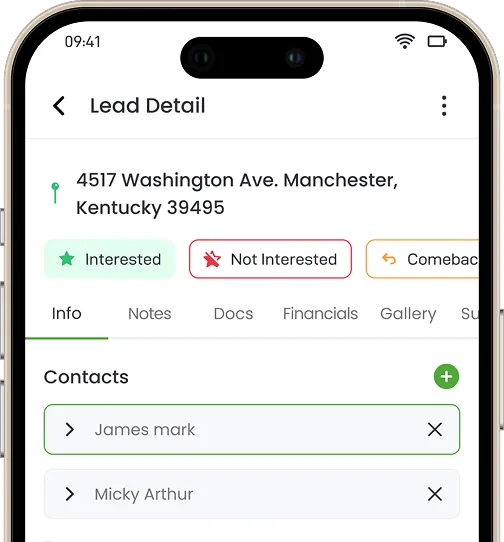
In Knockio, this is where the job record does the heavy lifting. Every job holds customer information, the address, contacts, notes, surveys, appointments, uploaded photos, files, and full activity history in one place. When a tech opens that job, there is one version of the truth. No hunting. No phone tag. The story is already there.
What a field service CRM actually does differently from a normal CRM
A standard CRM is great for sales teams. It is built for tracking calls, emails, and deals. But for someone working in the field, it feels like an office tool that was never meant for muddy boots and a phone in a glove.
A field service CRM is built differently. It is made to get work done.
It closes the gap between the office and the job site. It pulls customers, jobs, schedules, technician activity, and job results into one place. It fits how a tech actually works, with quick mobile updates and photo uploads that don’t feel like extra chores.
In plain terms, a field service CRM answers the questions a tech has the moment they arrive:
- What am I doing at this job?
- What happened the last time we were here?
- What should I check first?
- Which parts do I need?
- What do I do if the job changes?
- How do I document this so nobody calls me later?
Answer those instantly and productivity rises on its own. Techs don’t have to work harder. They just stop hitting walls.
Knockio handles this with dynamic job statuses and job views. You create your own statuses, name them to match how your company actually works, and assign roles to them. Those statuses then power your boards, stages, and team processes. A tech can see exactly where a job stands. The office can too. Nobody is guessing.
Features that directly improve technician productivity
Below are the field service CRM features that matter most for getting work done, and the real problems each one solves.
Mobile job access and full history on the phone
The tool. A tech opens a job on their phone and sees the full history. Every past note, every photo, every detail about what is on-site.
The result. No more calling the office for basics. The tech walks in already knowing the story.
This is a huge win because it kills “search time” before work even starts. When a tech has the full picture in hand, they diagnose faster and make fewer mistakes. In Knockio, that history lives on the job itself, so the notes, files, and media from the last visit are right there before the tech knocks.
Clear job steps and checklists
The tool. Simple step-by-step guides with the fields a tech actually needs to fill.
The result. Less rework, fewer missed steps, fewer return trips.
Checklists aren’t about micromanaging. They clear mental clutter. On a packed day, a tech shouldn’t have to lean on memory alone. The checklist remembers so they can focus on the work. That keeps quality high and prevents those “I wish I’d checked that” moments that drag a job back to your schedule a second time.
Smart scheduling and dispatching
The tool. A dispatch view that considers who is closest, who is free, and who has the right skills.
The result. Less drive time and fewer wrong-tech assignments.
A tech is at their best when working, not sitting in traffic. Bad dispatching burns time, fuel, and energy. Good scheduling turns a chaotic day into a clean route. In Knockio, you move a job forward through real stages: from appointment to assigned crew, to a work order, to a job update, to an invoice. The job carries its own appointments and assignees, so handoffs stop falling through the cracks.
Real-time job status and activity tracking
The tool. Live status updates, check-ins, timestamps, and activity the office can see right away.
The result. Fewer “where are you?” calls and faster decisions.
Techs hate being nagged every twenty minutes. Offices hate being in the dark. Live visibility fixes both. With Knockio’s map view and board view, managers can see where work is moving, which jobs need attention, and where a follow up is slipping, all without interrupting the tech. This is field control, not spying. A manager spots the gap during the day and steps in while there is still time to help.
Customer communication and automated updates
The tool. Automatic “on my way” texts, “tech en route” messages, and status updates.
The result. Fewer missed appointments and less waiting around.
Nothing kills momentum like driving thirty minutes to a locked door. That is wasted fuel and a hole in the schedule that is hard to fill. Knockio’s Automation Flow Builder can send those reminders, follow-ups, and job updates on its own, so the customer is actually home when your tech pulls in. The office stops manually chasing every appointment.
Digital forms, photos, and signatures
The tool. Mobile forms for inspections and service reports, plus digital sign-offs.
The result. Faster closeouts, fewer disputes, less paperwork.
Paperwork is a thief. Too often a tech finishes the work but loses time later re-entering notes back at the office. With everything captured on the job in Knockio, including photos, files, surveys, and signed estimates, the tech is truly done when the work is done.
Quotes, approvals, and on-site invoicing
When a tech finds a bigger issue, they shouldn’t have to wait on an email. In Knockio, estimates support optional line items, templates, digital signatures, customer acceptance, and change orders, all from a product and service catalog. The tech shows a couple of photos, builds the estimate on-site, and gets the customer to sign right there. Then payment can be collected through text to pay, tap to pay, credit card, or ACH, or entered manually for the books. The job record updates as it happens.
Route planning and territory control
Route planning matters more than most teams admit. Line up jobs sensibly within one area and everything downstream gets easier. Your team fights less traffic and works more. Even small pockets of saved drive time add up fast over a week, which creates room for more work without pushing techs harder.
Real job-flow examples that show the gains
This all sounds good in theory. It only counts if it shows up on a normal workday. Here is what changes on an ordinary workday.
Example 1: An HVAC maintenance visit with fewer back-and-forth calls
The old way: the office books a generic “maintenance visit.” The tech pulls up flying blind. No idea what the last person found or what unit is in the attic. Before touching a wrench, they burn twenty minutes on the phone while the office digs through spreadsheets.
With an HVAC service CRM, the tech taps the job on their phone and instantly sees unit details, past service notes, and photos of the last repair. They follow a quick checklist, snap a done photo, and move on. That start-up confusion is gone, and the team fits in more work without ever feeling rushed.
Example 2: A plumbing repair with the right parts in the van
Plumbing is where the difference shows up fast. A customer reports a “leak under the sink.” The notes are vague. The tech arrives with a standard kit and realizes they need an odd fitting that isn’t in the van. Now they are driving to a supply house, and a twenty-minute fix turns into a two-day ordeal with a frustrated customer.
When intake used guided questions and custom fields to capture the real details up front, the likely parts were flagged before the tech ever pulled out of the driveway. They show up with the right gear. One trip, done. Killing return visits is one of the biggest productivity wins there is.
Example 3: A solar service call with clear job ownership
The old way: dispatch hands the job to whoever is free. The tech climbs onto the roof, looks at the panels, and realizes within five minutes the repair needs a licensed electrician. Now calls fly back and forth and the day’s schedule falls apart.
With role-based statuses and assignees in Knockio, the right person is on the job from the start. If the scope changes on-site, the tech updates the status, and the office sees it instantly on the map and board. They reassign in seconds, solve the problem faster, and protect the rest of the day’s schedule.
Comparison: the features that actually move technician productivity
When you compare platforms, ignore the sales talk. Watch what each tool actually reduces. If it doesn’t cut phone calls, drive time, or rework, it isn’t a productivity tool. It is an expensive digital filing cabinet.
| What your team actually needs | The Tool | The Headache it kills | The Result |
|---|---|---|---|
| No more flying blind | Mobile job history | The “What am I doing here?” confusion | Faster starts; zero calls to the office for info. |
| Getting it right the first time | Digital checklists | Those “I forgot to check that” callbacks | Higher quality; no more unpaid return trips. |
| A schedule that makes sense | Smart dispatching | Zigzagging all over town | A smooth day with more jobs actually finished. |
| Peace and quiet to work | Real-time status | Constant “Where are you at?” interruptions | Focused techs; a much quieter office. |
| Ready customers | Automated ETAs | The frustration of locked doors | No more wasted fuel on “no-shows.” |
| To be “Done” at 5:00 PM | Mobile data capture | The “paperwork is waiting at home” blues | Instant closeouts; no evening data entry. |
What makes Knockio a strong choice for field productivity
Plenty of software throws around the word “productivity.” But there is a real difference between a tool built for a desk and a tool built for a truck. Many CRMs are generic platforms stretched to fit field work. They were never meant for it.
Knockio was built for the home service industry from the start. It is not a place to park leads. It is a place to run your day. It fits the reality of technician schedules, messy job sites, and the constant need for clear records.
The bigger point: most teams are paying for five to ten separate tools that don’t talk to each other. One for the CRM, one for estimates, one for invoicing, one for scheduling, one for payments, one for forms. Knockio replaces that stack with a single connected system, so a job moves from first contact to final payment without ever leaving the platform.
One job truth, fewer calls
Nothing slows a day like phone tag. In Knockio, customer history, the site, photos, and job notes all live on one job. Techs stop calling the office for basics. And because the office sees live updates, they stop interrupting the tech to ask how much longer. That shared visibility saves time on both sides, every day.
Consistent steps and clean documentation
A system only works if it is repeatable. Knockio makes it easier to standardize how jobs get done, with notes, surveys, photos, and files captured on the job without it feeling like a chore. Consistent records protect the business and the tech. When everything is logged, there is less finger-pointing and fewer “what happened here?” conversations later.
Better routing, scheduling, and territory control
Techs are most productive when they are working, not sitting in a van. Knockio’s mapping and route planning help build schedules that make sense in the real world, not just on a spreadsheet. Organize jobs logically, keep techs in their areas, and those ten-minute savings on the road add up to hours back by week’s end.
CRM memory plus field execution
Some platforms manage customers well but fall apart on dispatch and field work. Others run dispatch but make history and notes hard to find. Knockio gives you both: the memory of a CRM that knows your customers, and the muscle of a field tool that schedules the job, runs the work order, and invoices it correctly.
Built to grow with you
As you grow, things get more complex. You need scheduling, job tracking, invoicing, reporting, communication logs, and automation working in sync. Knockio is built so you don’t have to switch tools every time you add a truck or a new service line. If you want better technician productivity now and stronger operational control later, that long-term fit matters.
Want to see how a single job moves from first call to final payment? Book a Free Demo and we will walk through it with your real workflow.
How to measure technician productivity after rollout
You shouldn’t have to guess whether your team got more productive. You should be able to see it. Less stress feels good, but the real proof shows up in numbers.
Once you adopt a field service CRM, these are the metrics worth watching.
- Jobs completed per tech per day. The most honest number you have. Even one or two more jobs per tech each week adds up fast across the team.
- First-time fix rate. Stop the repeat visits and you just added capacity without hiring anyone.
- Average drive time per job. Better routing shows up here. Less time on the road means lower fuel costs and more energy left for the work.
- Time from arrival to job start. Watch how long it takes from the van hitting the driveway to the work actually starting. Clear job details and checklists on the phone shrink that gap.
- Admin follow-up time after a job. You know the system is working when the office spends less time chasing notes, photos, and missing details.
- Missed appointment rate. When techs stop pulling up to empty houses, they stop wasting their most valuable asset. Automated reminders bring this number down fast.
Track these for thirty days before and thirty days after. Even small shifts will show you whether the change is real.
Common mistakes that kill the productivity gains
A CRM isn’t a magic button. It doesn’t improve anything just by being installed. A messy rollout can actually slow a team down. Avoid these.
- Too many fields on job forms. If a tech has to fill twenty boxes to close a simple call, they will hate the system. Keep forms short and practical.
- No job templates. If the office builds every job from a blank page, techs are left guessing. Set up templates for your common work types so everyone starts on the same page.
- Poor scheduling discipline. It is tempting to ignore the map and send whoever is free because a customer is shouting. That keeps routes inefficient. Trust the process.
- Weak training and adoption. Most techs don’t want a three-hour slideshow. They need short, hands-on training built around the jobs they actually run.
- Ignoring reporting. If you never look at reports, you never learn where time leaks. Even basic reports show where small changes make a big difference.
Final takeaway
Technician productivity isn’t about pushing people to work harder. It is about building a system that removes friction, clears up confusion, and lets techs make decisions without waiting on a callback.
The right field service CRM makes life easier for everyone. It cuts back-and-forth calls, clarifies job steps, and keeps everything accessible on mobile. Automate the reminders, simplify the paperwork, and your team stops drowning in admin and gets back to the work they were trained to do.
If you want a field service CRM that balances a powerful office tool with a simple field app, Knockio fits. It helps teams move faster in the field, stay aligned in the office, and build workflows that scale as you grow.
What should field service companies look for in a CRM that improves technician productivity?
Absolutely. You don’t need a massive enterprise budget to fix a messy schedule. The secret is to find a tool your techs will actually use. The biggest mistake that you can make is buying the “biggest” tool instead of the most usable one. If your technicians use it daily, you win.
Knockio is built for fast adoption without sacrificing operational depth. Teams can configure scheduling, job workflows, permissions, communication, invoicing, reporting, and automation around their current operation and continue using the same platform as departments, crews, service areas, and locations expand.
Which field service CRM platforms are best for enhancing technician productivity?
The “best” platform isn’t the one with the most buttons. It is the one that removes daily friction in the field. You should look for the tool that handles the essentials like mobile access, smart scheduling, and easy documentation. Even though there are plenty of big-name options out there, Knockio is a standout choice if you want to kill the constant back-and-forth calls and give your team total clarity on every job.
How do cloud-based field service CRM solutions improve technician access to information?
Cloud-based systems keep everything from job details, customer history, notes, and photos, to updates, available from anywhere. A tech can pull up a customer’s full history while standing in their driveway, and the office can see a job status change the second it happens. In short, cloud access turns information into something technicians can use immediately, instead of something they have to chase.
How does a field service CRM boost technician productivity in the field?
It does the “boring” stuff so your techs can do the “expert” stuff. It improves productivity by removing common time-wasters: unclear job details, constant phone calls, messy schedules, wasted drive time, missing parts, slow approvals, and heavy paperwork. A Field Service CRM gives technicians mobile access to job context, guides them with clear steps, helps dispatch build better routes, and speeds up job closeout with digital forms and photos. By using field service CRM, you’re making it possible for your team to finish more jobs with a lot less stress.

Waqar Hussain leads SEO and digital media at Knockio, a field sales and field service management (FSM) platform for businesses managing sales reps, field teams, jobs, and customer appointments. He focuses on content strategy, search growth, and digital media to help more teams discover better ways to manage leads, jobs, and field operations.