Home Service Business Software in 2026: What the Data Shows

Home Service Business Software in 2026: What the Data Shows

 Disclosure: Knockio builds software in this category. Every statistic below comes from a third-party source and is linked at the bottom.


If you’re shopping for home service business software right now, most of the pitches you’re hearing are about features. The more useful question is narrower: where is your company already losing money, and can software stop it?

Start with the market you’re operating in. American homeowners spent an estimated $521 billion on improvements and maintenance to owner-occupied homes over the four quarters ending in Q1 2026. The Harvard Joint Center for Housing Studies expects that to reach $523 billion by early 2027 (Harvard JCHS, Leading Indicator of Remodeling Activity, May 2026).

Half a percent. A very large market that has stopped growing.

Back in 2023, when the same index was posting double-digit annual gains, sloppy operations were survivable. Leads slipped. Estimates went out three days late. Nobody noticed, because there was another lead behind it.

At half a percent, there is no lead behind it.

We went through the federal data, the trade surveys, and two Harvard Business Review studies to figure out where the money actually goes. What follows is what we found, and what it means for the software you buy.

What’s in here:

  1. The market you’re buying software for
  2. Why demand is locked in for the next decade
  3. Why most home service software is built for the wrong company
  4. The labor math, by trade
  5. Four places home service companies lose money
  6. What this software actually includes, and what it costs
  7. Five questions to ask before you buy

Short on time? See how Knockio handles it, or book a 15-minute demo.


The Market You’re Buying Software For

What the federal data says

The US Census Bureau put total construction spending at a seasonally adjusted annual rate of $2.21 trillion in May 2026, with private residential construction accounting for $930.2 billion of that (US Census Bureau, Monthly Construction Spending, released July 1, 2026).

Specialty trade contractors, the census category covering most home service work, employed 5.25 million people as of March 2026. There were 599,074 private establishments in the category as of Q4 2025 (Bureau of Labor Statistics, Industries at a Glance: NAICS 238).

Private research lands in the same place. IBISWorld sizes US handyman services alone at $365.4 billion across roughly 529,000 businesses in 2026, after five years of 2.6% compound annual growth, with a 0.8% contraction expected this year.

What homeowners are actually spending

Consumers haven’t stopped spending. They’ve stopped spending impulsively.

Angi’s State of Home Spending report found the average homeowner spent $12,472 on their home in 2025, up 3.5% from $12,050 the year before, across an average of 10 projects rather than 9 (Angi, January 2026).

So: more jobs, thinner tickets. Volume’s holding. Ticket sizes aren’t. Whatever margin you get this year, you’re going to have to run it out of your own operation.

With Knockio: When average job value flattens, throughput becomes the lever. Knockio keeps canvassing, scheduling, dispatch, and invoicing in one system so more jobs move per week without adding office headcount to manage them.


Your Demand Problem Isn’t a Demand Problem

The American Community Survey has one number worth taping to a wall.

The median age of an owner-occupied home in the United States hit 42 years in 2024. In 2005 it was 31 (National Association of Home Builders analysis of ACS data, March 2026). Nearly 47% of owner-occupied homes were built before 1980. Roughly 34% predate 1970.

Between 2014 and 2024, the share of owner-occupied homes at least 45 years old climbed from 39% to 47%, while homes built within the last 14 years fell from 18% of the stock to 13%.

Roofs fail. Water heaters fail. Panels max out, and the HVAC system installed during the Clinton administration is getting replaced right now, by somebody. Aging housing stock doesn’t check the Fed’s calendar.

There’s a second lock-in effect worth knowing about. Angi found 74% of millennial homeowners said mortgage rates were pushing them to improve their current home instead of moving. People staying put means people renovating, and it means the same homeowner needs you again in three years.


Why Most Home Service Business Software Is Built for the Wrong Company

Here’s the number the software category tends to talk around.

Analysis of Census Bureau County Business Patterns data by CPWR found that from 2014 to 2023, 91.0% of payroll establishments in construction had fewer than 20 employees. More than four out of five, 81.7%, had between one and nine (CPWR, Data Bulletin, April 2026). Nonemployer establishments — owner-operators with no payroll at all — grew 20.8% over the same period, from 2.4 million to 2.9 million.

If you’re running a crew of eight, you’re not the exception in this industry. You’re the median.

Now think about what enterprise field service software assumes. It assumes an operations manager. A dispatcher. A dedicated CSR team. An admin who reconciles the CRM against the accounting system on Fridays. A three-month onboarding window, and somebody whose actual job is owning the rollout.

Most home service companies have none of that. The owner is the operations manager. And the dispatcher. And the guy who forgot to send Tuesday’s invoice — he was on a roof in Tulsa.

When people say home service businesses “resist technology,” this is what they’re actually observing. The tools were designed for a company structure that 91% of the industry doesn’t have.

With Knockio: Built for small teams and 100+ user enterprises alike. Get started at $25/user/mo (1–4 users) or $20/user/mo (5+ users). Explore our flexible pricing plans


The Labor Math

The Bureau of Labor Statistics publishes ten-year occupational projections. Here are the 2024–2034 figures for the four core trades:

Trade 2024 employment Projected growth Openings per year Median pay (2024)
Electricians 818,700 9% ~81,000 $62,350
Plumbers, pipefitters, steamfitters 504,500 4% ~44,000 $62,970
HVAC and refrigeration techs 425,200 8% ~40,100 $59,810
Roofers 166,700 6% ~12,700 $50,970

Source: US Bureau of Labor Statistics, Occupational Outlook Handbook, 2024–2034 projections.

That’s roughly 178,000 openings a year across four trades, and you’re competing for those hires against every other shop in your county. Most of those openings are replacements for people retiring or leaving the field, not net new positions.

Meanwhile there were 259,000 open construction jobs in April 2026 (BLS Job Openings and Labor Turnover Survey, via FRED).

So what does that leave you with? The Federal Reserve’s 2026 Report on Employer Firms, based on 6,525 employer firms surveyed between September and November 2025, ranked hiring or retaining qualified staff as the second most common operational challenge small businesses face. The first was reaching customers and growing sales.

You can’t hire your way out of a bottleneck, and you’re simultaneously struggling to find enough work for the technicians you already have. Same root cause. The work isn’t moving cleanly through the business.


Where Home Service Companies Actually Lose Money

Four leaks. Each one is measurable, and each one has research behind it.

Leak 1: Leads go cold before anyone touches them

The most-cited work on this is still a 2011 Harvard Business Review audit, and nobody has replicated it at that scale since. James Oldroyd, Kristina McElheran and David Elkington examined response behavior at 2,241 US companies and tracked 1.25 million sales leads across 42 firms.

Their findings: 37% of companies responded to a lead within an hour. 16% responded within one to 24 hours. 24% took longer than a day. And 23% never responded at all. Among companies that responded within 30 days, the average response time was 42 hours.

The conversion penalty is brutal. Firms that contacted a prospect within an hour were nearly seven times as likely to qualify that lead as firms that waited just one hour longer, and more than 60 times as likely as firms that waited a full day (Harvard Business Review, The Short Life of Online Sales Leads, March 2011).

Now apply that to field sales. A canvasser knocks a door at 4:15 pm. The homeowner is interested. The rep writes it on a notepad or drops it in a personal notes app, finishes the street, drives home, and enters it into the CRM the next morning if he remembers.

That lead is already outside the seven-times window. It was outside it before the rep got back to the truck.

With Knockio: A lead captured at the door lands in the pipeline instantly, with the address, the notes, a voice memo if the rep prefers talking to typing, and a follow-up assigned. Nothing waits for the end of the shift.

Leak 2: Your software stack has become a second job

ServiceTitan surveyed more than 1,000 US residential service contractors and asked what technology they use. The answers overlapped heavily: 63% use business management software, 48% use field service management software, 42% use accounting software, and 38% use an ERP system (ServiceTitan, Residential Services Industry Research).

That’s not four categories of company. That’s one company running four systems.

The cost of that is documented. A Harvard Business Review study by Rohan Narayana Murty, Sandeep Dadlani and Rajath B. Das tracked 137 users across 20 teams at three Fortune 500 companies for up to five weeks. Workers toggled between applications roughly 1,200 times per day, and spent just under four hours a week reorienting themselves afterward. Nine percent of the week, gone to re-finding your place (Harvard Business Review, August 2022).

Do the math on your own week. Nine percent of 50 hours is four and a half. For an owner-operator, that’s most of a Friday, every week, spent moving between a canvassing app, a CRM, a scheduling tool, an invoicing platform, and the spreadsheet that reconciles the ones that don’t talk to each other.

Salesforce’s State of Sales report, based on 4,050 sales professionals across 22 countries surveyed in August and September 2025, found reps now spend only 40% of their time actually selling. Among sales leaders already using AI, 51% said disconnected systems were slowing their AI initiatives down.

We put real numbers on this specific problem in The cost of running separate canvassing and field service software.

Curious what your own stack is costing? See what one platform runs — $20 per user per month, no setup fee.

Leak 3: The sales-to-operations handoff

This is the leak owners underestimate most. It never shows up as a lost deal. It shows up as an extra hour on a Thursday, and then it shows up again.

A rep closes at the door. Somebody re-keys the customer into the CRM. Somebody else builds the estimate in a separate tool. The signed contract arrives as a PDF in an email thread. Dispatch schedules the crew from a whiteboard or a shared calendar. The crew shows up without the photos the rep took of the damaged section. The invoice gets rebuilt from scratch in accounting software, from a job number nobody wrote down correctly.

Every one of those transitions is a place the job can change shape. Wrong address, missing scope, a discount the rep promised that never made it onto the invoice. Or a callback because nobody told the crew about the dog.

The Federal Reserve survey named reaching customers and growing sales as the top operational challenge for small employer firms. But you can’t grow sales through a pipeline that leaks at every handoff.

With Knockio: The record created at the door is the same record the crew works from and the same record the invoice is generated against. Photos, notes, contracts and scope travel with it through work order management. Nobody retypes anything.

Leak 4: Cash arrives last, slowly

Home service is one of the few industries where the work’s done, the customer’s happy, and two weeks later you still haven’t been paid.

The Federal Reserve’s 2026 survey found rising costs of goods, services and wages to be the top financial challenge for small employer firms, with more than four in ten also citing tariff-related increases. Seventy-seven percent reported one of those two pressures or both. Revenue expectations fell to their lowest index level since the 2020 survey.

When margins compress, days-to-payment stops being a bookkeeping detail and becomes a survival metric. If you’re waiting 21 days to invoice because the paperwork sits in three systems, you’re financing your customers for free at the exact moment you can’t afford to.

With Knockio: Estimates convert to contracts, contracts to work orders, work orders to invoices, and invoices to collected payment inside one flow. The crew can close out and collect on site.


What Home Service Business Software Actually Includes

The category is broader than most buyers realize, and vendors rarely cover all of it. Five functional blocks:

Lead generation and field sales. Door-to-door canvassing, territory management, route planning, GPS tracking, and rep performance reporting. Mostly ignored by traditional field service management platforms, which assume the lead arrives by phone.

CRM and pipeline. Customer records, deal stages, follow-up sequences, and business texting and calling.

Job execution. Scheduling, crew dispatch, work orders, photo and document capture, and inventory.

Money. Estimates, digital contracts with e-signature, invoicing, and payment processing. This is where accounting integrations matter — most shops still run QuickBooks behind whatever else they use, so check the integration list before you commit.

Reporting and automation. Dashboards and automated reminders, follow-ups and status updates.

Most companies buy blocks one and two from one vendor and blocks three through five from another. That’s the split that creates Leak 3.


What Home Service Business Software Costs in 2026

Rough market bands, per user per month, for a small to mid-sized shop:

$20–$40. Single-purpose tools. A canvassing app, or a scheduling and invoicing tool. Cheap, fast to adopt, and you’ll need two or three of them.

$40–$100. All-in-one platforms aimed at small business. Usually cover CRM through invoicing. Field sales coverage varies widely and is worth testing specifically.

Quote-only. Enterprise field service management. Often five figures a year plus implementation, with onboarding measured in months. Built for the 9% of contractors with 20 or more employees.

Two costs almost nobody quotes: setup fees, which can run into the thousands, and the parallel-running period where your team maintains the old system and the new one at once. For a ten-person company, a platform that takes a quarter to implement may never pay itself back.


What All-in-One Home Service Software Fixes, and What It Doesn’t

Consolidation gets oversold, so let me be precise.

It won’t sell for you. A bad pitch on a doorstep is a bad pitch no matter what app records it. And it won’t install follow-up discipline in a company that has none.

What it removes is the money that falls between systems. Based on the research above, that includes the seven-times conversion penalty on slow lead response, the 9% of work time lost to application toggling, the 60% of selling time that goes to non-selling activity, and the working capital tied up in a slow invoice cycle.

None of those are strategy problems. They’re plumbing problems. And unlike interest rates, they’re inside your control.


Where Knockio Fits

Knockio is a unified field service platform built for the small and mid-sized home service company. It covers the two halves that usually get bought separately.

The canvassing side

Door-to-door lead capture, territory mapping, route optimization, GPS tracking, notes and voice memos, and pipeline management.

The operations side

Scheduling, crew dispatch, work orders, estimates, digital contracts with e-signature, invoicing, payment collection, inventory, and reporting.

Both run on native iOS and Android apps. The people using them are standing in a driveway.

Coverage and pricing

Knockio runs across 15 verticals. The big ones: roofing, solar, HVAC, plumbing, electrical, fiber internet, pest control, landscaping, pool service and restoration.

Plans start at $20 per user per month at five seats, $25 below that, with no setup fee and no contract. You can run the canvassing module alone, the CRM alone, or both connected.


5 Questions to Ask Before You Buy Home Service Business Software

In order of how much money they represent.

1. How long does a lead sit between capture and first contact?

Time it for one week. If the answer is measured in hours rather than minutes, that’s your most expensive problem, and the HBR data tells you roughly what it costs.

2. How many systems does one job touch from door to deposit?

Count them honestly, including spreadsheets and group chats. Every number above one is a place data gets retyped.

3. How many times does the same information get entered?

Customer name, address, scope, price. If any of those get typed twice, you’re paying for the same work twice and inviting a mismatch.

4. Can a rep in the field do the whole job on a phone?

If any step requires getting back to an office computer, that step will happen late or not at all. Test it on a real job, not a demo account. Our take on what that should look like is in Field Service CRM.

5. What does onboarding actually cost?

Not the license fee. The hours your team spends learning it, migrating data, and running two systems in parallel.

If you’re comparing against a specific incumbent, we publish head-to-head breakdowns for ServiceTitan, Jobber, Housecall Pro, JobNimbus, FieldPulse and SPOTIO.


Frequently Asked Questions

What is home service business software?

Software that manages the operational workflow of a residential service company: capturing and tracking leads, scheduling jobs, dispatching crews, producing estimates and contracts, and invoicing and collecting payment. Some platforms cover only the sales side, some only the back office, and fewer cover both.

How much does home service business software cost?

Single-purpose tools run roughly $20–$40 per user per month. All-in-one platforms for small business typically land between $40 and $100. Enterprise field service management is usually quote-only and often five figures a year plus implementation. Knockio starts at $20 per user per month with no setup fee.

How big is the home services industry in 2026?

Harvard’s Joint Center for Housing Studies puts annual spending on improvements and maintenance to owner-occupied homes at $521 billion as of Q1 2026, projected to reach $523 billion by early 2027. US Census data shows private residential construction running at a $930.2 billion annual rate as of May 2026.

What’s the difference between field service management software and a CRM?

A CRM tracks the customer relationship and the sales pipeline. Field service management software runs the job: scheduling, dispatch, work orders, and job costing. Most home service companies need both, which is why they end up with two systems and a reconciliation problem.

Is all-in-one home service software better than separate tools?

For most small shops, yes, and the reason is measurable. A Harvard Business Review study found workers toggling between applications about 1,200 times a day, costing just under four hours a week, roughly 9% of work time. Separate tools also break the sales-to-operations handoff, where scope and pricing errors originate.

Does home service software work with QuickBooks?

Most established platforms offer some form of accounting sync, but depth varies a lot. Confirm whether it pushes invoices only, or invoices plus payments plus customer records, before you commit. Knockio’s current list is on the integrations page.

How fast should you respond to a home service lead?

Within an hour, and ideally within minutes. The Harvard Business Review audit of 2,241 companies found that contacting a lead within one hour made a firm nearly seven times more likely to qualify it than waiting a single hour longer, and more than 60 times more likely than waiting a full day.


Ready to Close the Gaps?

The market isn’t going to grow you out of this one. Half a percent says so. What’s left is the revenue already sitting in your pipeline that never turns into a collected invoice.

Book a 15-minute demo. Bring one job you lost last month and we’ll show you where it leaked. No setup fee, no contract.


Sources

Market size and growth

Housing stock age

Industry structure and firm size

Labor and employment

Small business conditions

Sales and operational research

Syed Junaid

Written by

Syed Junaid

Marketing Lead & Content Strategist at Knockio

Syed Junaid is the Marketing Lead & Content Strategist at Knockio, where he helps field sales and service businesses eliminate software bloat and scale their operations. He writes about B2B SaaS growth, field sales strategies, and how contractors can eliminate the “Duct-Tape Tax” to run more profitable businesses.
Real All-In-One Sales and Service Software (Most Aren’t)

Real All-In-One Sales and Service Software (Most Aren’t)

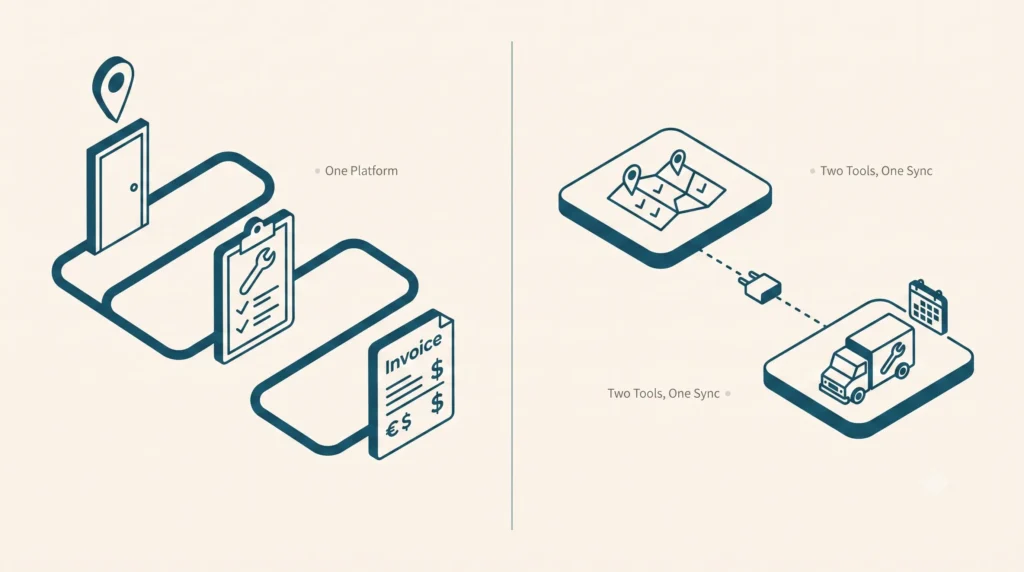
If your “all-in-one” platform needs an integration to move a lead into a job, it isn’t all-in-one. It’s two products with a shared login page.

It s 4:45 PM on a Friday. Your office manager is still at her desk, copy-pasting a customer s name, address, and job notes from your canvassing app into your scheduling tool by hand because the two systems don t actually talk to each other; they just email a spreadsheet back and forth once a night.

If your “all-in-one” platform needs an integration to move a lead into a job, it isn’t an all-in-one. It’s two products with a shared login page. “All-in-one” has become the most overused phrase in field service and sales software marketing and the least verified.

Almost every vendor claims it. Almost none mean it the same way. This guide gives you a reliable way to spot the difference before you sign a contract, rather than after you’ve migrated your data twice.

Table of Contents

  1. What “All-In-One” Actually Means (And What Most Vendors Mean By It)
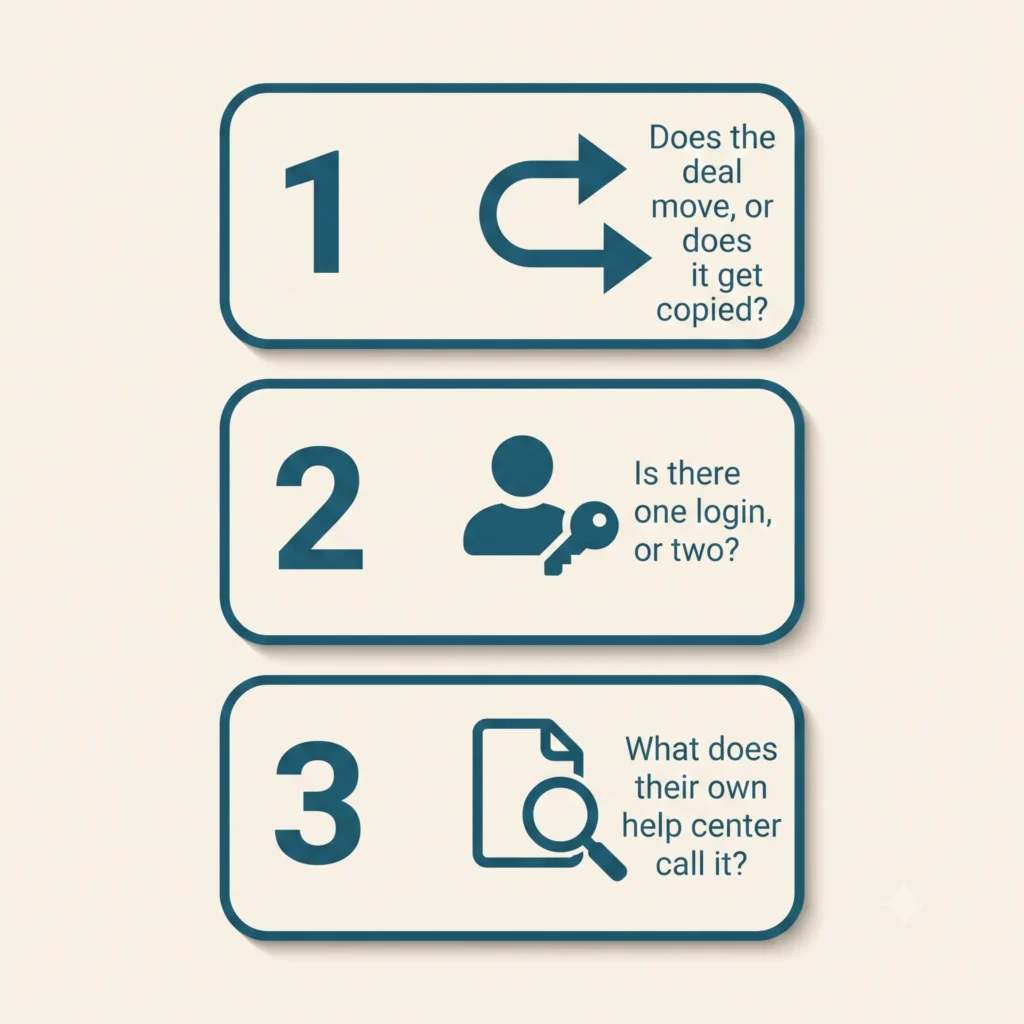
  2. The 3-Question Test to Spot a Fake All-In-One
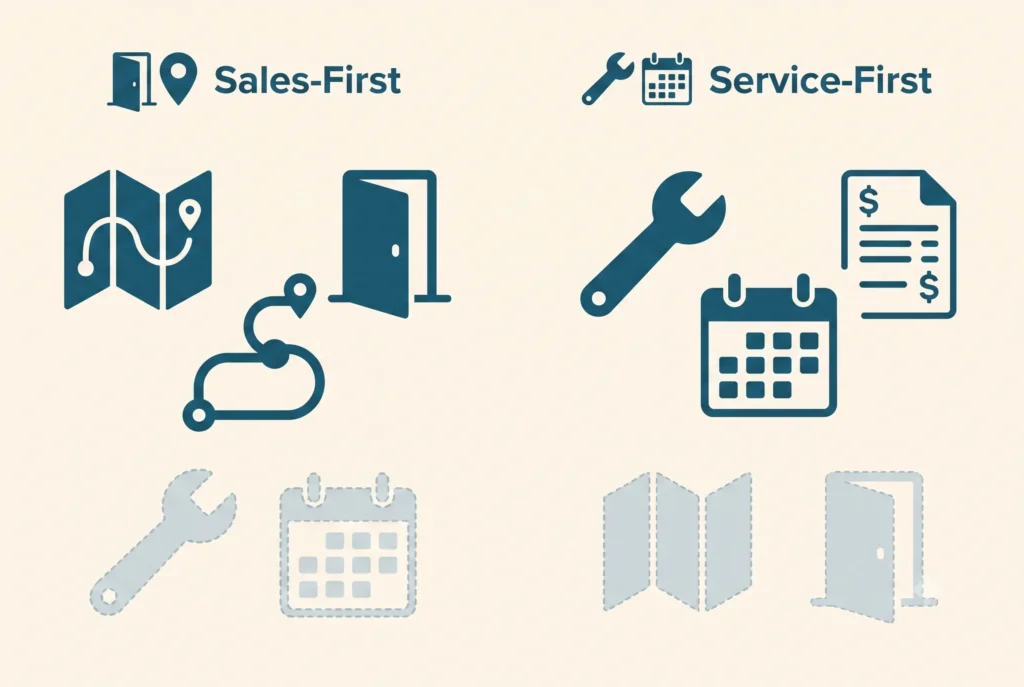
  3. Sales-First vs. Service-First: Two Flavors of the Same Bolt-On Problem
  4. What a Truly Connected Workflow Actually Looks Like
  5. Common Mistakes Buyers Make When Evaluating “All-In-One” Claims
  6. Frequently Asked Questions

What “All-In-One” Actually Means (And What Most Vendors Mean By It)

There are two completely different things hiding under one marketing phrase.

  1. “Marketing” All-In-One: A vendor got really good at one half of the job either running a door-knocking team or running a dispatch board and then acquired, partnered with, or bolted on something to cover the other half. It looks seamless in a 20-minute sales demo. In real life, it relies on a nightly batch sync, a Zapier connection, or an integration your team has to babysit.
  2. True All-In-One: One login, one monthly bill, and one support line if something breaks. The lead your rep captured at the door on Tuesday and the job ticket your dispatcher opens on Thursday are the exact same database record not two files sync’d together across platforms

We call the cost of running the second kind the Duct-Tape Tax the hidden toll of redundant subscriptions, duplicate data entry, and manual record reconciliation. On average, growing field operations lose 12 to 15 hours per week in administrative friction and pay an extra $800 $1,500/month in overlapping seat licenses.

The tell isn’t in the sales deck. It’s in what happens the exact moment a prospect turns into a scheduled job.

The 3-Question Test to Spot a Fake All-In-One

Ask these on the sales call, not after you’ve signed. A vendor running one real system will answer all three straight, no hedging.

1. Does the deal move, or does it get copied?

Ask them: “When my rep closes a deal at the door, does that exact same profile turn into my job ticket, or does the system just copy the data over to a new record?” If their answer includes the word “sync” or “Zapier,” you’ve caught a fake all-in-one.

In a real one-system platform, that lead doesn’t get copied anywhere it just changes status, from “lead” to “scheduled job,” with the same name, address, and notes still attached. In a bolted-together stack, a brand new record gets created in the other app, filled in with whatever fields the integration bothered to grab. Usually not all of them.

2. Is there one unified login, or two?

Ask them: “Can the same person log into one app and see both the sales pipeline and today’s job schedule or does my rep need one login and my dispatcher need a different one?” If your canvassing team and your service team are logging into two different apps with two different support numbers, you’ve got two products wearing one company’s logo.

3. What does their own help center call it?

Here’s a trick that takes thirty seconds: pull up the vendor’s help center or “integrations” page while you’re still on the call. If dispatching or scheduling shows up under “Integrations & Partners” instead of “Features,” they just told you the truth in the fine print, even if their homepage says something else.

Run this test against any platform you’re evaluating including us. We’ll cover exactly how Knockio holds up against specific competitors next, with sourced comparisons, not just claims.

Sales-First vs. Service-First: Two Flavors of the Same Bolt-On Problem

Once you start looking for it, the pattern splits into two camps.

Sales-first platforms are genuinely great at the map, the routes, and tracking who knocked which door, because that’s the entire product. Dispatching a crew, tracking a job to completion, and cutting an invoice get bolted on later, usually through a partner integration that can’t really handle a busy Tuesday. It works fine right up until that closed deal needs a technician on-site with the right parts.

Service-first platforms are the flip side. They’re excellent at scheduling, dispatch, and invoicing for work that’s already booked, because that’s what they were built for. But ask them to run outbound sales and there’s nothing there: no territory assignment, no door-knocking map, no way to see how many doors a rep knocked today. Some bolt on a few CRM fields and call it “sales-ready.” A few text fields aren’t a canvassing engine.

We don’t blame either kind of company for this. Building a genuinely good canvassing map is hard. Building a genuinely good dispatch board is hard. Most software companies only get really good at one so they build a bridge to the other and put an “all-in-one” sticker on the homepage. It’s not a scam. It’s just not what the label promises.

“All-in-one” should mean neither half was an afterthought. In a bolted-together stack, one half always is.

What a Truly Connected Workflow Actually Looks Like

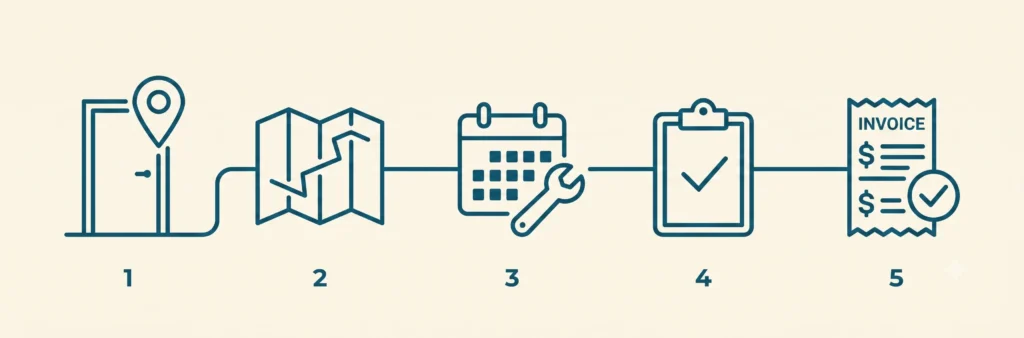
Here’s what that actually looks like on a Tuesday, without a single third-party plugin stitching it together:

  1. A rep knocks a door and logs a lead on the territory map, GPS-stamped, assigned to that rep’s route.
  2. The homeowner says yes. The same record no export, no re-entry becomes a scheduled job.
  3. A crew gets dispatched to that exact address, with the lead’s notes, photos, and pricing conversation already attached.
  4. The job is completed, an estimate or invoice is generated from the same record, and payment is collected.
  5. One support line, one login, one company, if anything breaks.

That’s how Knockio actually works: canvassing and field service running as one connected system, not two apps stitched together with a sync job. The lead your rep captured on the map Tuesday morning is the exact same file your dispatcher opens Tuesday afternoon because it never left the system it started in.

This isn’t a claim you have to take on faith. It’s the same reason we can publish pricing that scales with users, not with the number of tools you’re stitching together because there’s only one tool.

Common Mistakes Buyers Make When Evaluating “All-In-One” Claims

Trusting the word “integrated” at face value. Every vendor’s marketing page uses this word. It means nothing on its own “integrated” can describe something genuinely built into the product, or a Zapier connection held together with hope. Ask which one it is.

Not asking what breaks if you cancel one “module.” If a platform is genuinely one product, there’s no such thing as canceling half of it. Ask: “What happens to my service scheduling if I downgrade my sales seats?” If the honest answer involves a separate contract or a separate app, that’s your tell.

Assuming one brand name means one system. Plenty of software companies grew by acquisition. The acquired product often keeps its own database, its own mobile app, and its own support team for years after the deal closes sometimes permanently. A shared logo on the homepage isn’t proof the two products were ever actually merged.

Skipping the trial for the workflow that matters most. Most buyers demo the half of the product they already know they need (sales teams demo the canvassing map; service teams demo the dispatch board) and take the other half’s existence on faith. Demo the handoff specifically: convert a test lead into a test job and watch what actually happens to the data.

Next Steps

If you’re currently running a canvassing tool and a field service CRM as two separate logins, you’re already paying the Duct-Tape Tax whether or not you’ve priced it out. Compare what a single-backend platform looks like on our comparisons hub, or book a demo and ask us the same three questions this post just gave you we’ll show you the handoff live, not in a slide.

FAQ

What does “all-in-one” actually mean in sales and service software?
Genuinely, it means one company, one login, and one bill cover both the sales/canvassing side and the field-service/dispatch side, with nothing connecting separate systems behind the scenes. In practice, a lot of vendors use the phrase to describe two connected products instead of one real one.

How can I tell if a platform is really unified or just well-integrated?
Ask what happens to a lead’s data when it converts to a job: does the same record move forward, or does a new record get created in a second system via sync or API? Also check whether users need separate logins for the sales and service sides, and whether the vendor’s own documentation lists the other half as a “feature” or an “integration.”

Does switching from separate tools to one platform actually save money?
Usually, yes beyond the second subscription fee, separate tools mean duplicate data entry, two support contracts, and staff time spent reconciling records between systems. We break down the specific cost categories in The Real Cost of Separate Canvassing & Field Service Software.

Is a platform still “all-in-one” if it was built by combining two acquired products?
Not necessarily. Sometimes the acquired product gets folded into one real system over time but plenty stay as two separate apps running side by side indefinitely, just sharing a logo. Ask whether the two products have actually been merged, not just rebranded.

Can a sales-focused canvassing app ever be a real substitute for field service management software?
Only if it natively supports scheduling, dispatch, and invoicing for completed work not just lead capture. If those functions live in a separate connected app, it’s a canvassing tool with a service integration, not field service software.

Syed Junaid

Written by

Syed Junaid

Marketing Lead & Content Strategist at Knockio

Syed Junaid is the Marketing Lead & Content Strategist at Knockio, where he helps field sales and service businesses eliminate software bloat and scale their operations. He writes about B2B SaaS growth, field sales strategies, and how contractors can eliminate the “Duct-Tape Tax” to run more profitable businesses.

The “Duct-Tape Tax”: The Real Cost of Running Separate Canvassing and Field Service Software

The “Duct-Tape Tax”: The Real Cost of Running Separate Canvassing and Field Service Software

If you are running a growing home-service business in roofing, solar, HVAC, or pest control, take a look at your monthly software billing statements.

Chances are, you are paying somewhere around $20 to $45 per user each month for an outside sales or door-knocking app to hunt for leads. Then, you turn around and pay another $13 to $65 per user each month for a traditional field service CRM to schedule crews, handle dispatching, and run invoices.

Call it the “Duct-Tape Tax”, the financial and functional price businesses pay for forcing disconnected point solutions to talk to one another.

Recent SaaS management industry data shows the average company now runs upwards of 100 separate software applications. Separately, a 2022 Harvard Business Review study by Rohan Narayana Murty, Sandeep Dadlani, and Rajath B. Das, tracking 20 teams and 137 users across three Fortune 500 companies, found employees toggled between apps roughly 1,200 times per day, burning nearly four hours a week, or about 9% of the work week, just re-orienting themselves after each switch. This constant back-and-forth context switching doesn’t just create mental fatigue; it bleeds hours of field productivity and leads to costly double data entry.

For a field operation, the gap between your outside sales maps and your back-office scheduling calendar is exactly where revenue goes to die. Let’s break down the hidden costs of managing a fragmented tech stack, what a truly unified workflow looks like on a single platform for field sales and field service, the math behind consolidating your operations, and a resource-efficiency upside that’s easy to overlook.

1. The Real Cost of a Broken Sales-to-Service Handoff

When your front-end sales team uses one software system and your back-office operations team uses another, your business relies on manual workflows disguised as automation. This friction typically causes three major operational bottlenecks:

The Double Data Entry Drain

When a door-to-door sales rep successfully drops a pin, captures a lead’s information, and secures a signed inspection agreement on a doorstep, that data sits trapped in the sales app. To get a technician out to the property, an office manager must manually copy and paste the customer’s name, phone number, address, and job notes into a separate dispatching tool. This mechanical transfer wastes hours of administrative time and introduces human error into your customer database.

The Communication “Dead Zone”

Outside sales reps move fast. They often make scheduling promises at the door based on what they think crew availability looks like. But because their canvassing tool is completely blind to the real-time scheduling grid of the service technicians, they routinely overpromise. The result? Frustrated dispatchers, rescheduled appointments, and a poor customer experience before the actual job even starts.

Broken Field Visibility

Managers suffer when data is split across silos. You cannot easily see your true Customer Acquisition Cost (CAC) or evaluate team performance when lead tracking lives in App A, but final invoice revenue and job costs live in App B. You are left trying to splice together CSV exports just to see if a specific neighborhood campaign was actually profitable.

2. The Ideal Connected Workflow: From First Knock to Final Invoice

True efficiency happens when your data layer is entirely unified. When your front-end hunting tools and your back-office farming tools share the exact same system of record, instead of living in two separate products the handoff between sales and service stops being a manual process altogether.

  1. Sales Rep Knocks & Captures Lead: instant internal handoff, no sync tools needed
  2. Office Manager Dispatches Tech Crew: real-time mobile execution
  3. Technician Services Property & Invoices On-Site

Here is how a connected field platform streamlines your daily operations:

Step 1: Smart Canvassing, Territory Management, and Turf Control

Your sales reps open a high-performance door-to-door canvassing app directly on their mobile devices. Managers use built-in territory management to cut clear boundaries on a map so reps never double-knock the same turf. As reps walk the neighborhood, they drop customized pins with single-tap dispositions (Not Home, Interested, Callback), building a location-verified database of the neighborhood in real time.

Step 2: Frictionless Office Dispatching

The moment a property owner agrees to an estimate or an inspection, the sales rep changes the lead status. Because the database is shared, this update triggers an alert on the office dashboard. The administrative team running field service management from the same system, instantly views the job details and uses a drag-and-drop calendar with route optimization to assign the nearest technician. There is no waiting for a daily sync, no manual re-typing, and zero communication delay.

Step 3: On-Site Service and Instant Cash Flow

The field technician receives the work order, routing navigation, and complete customer history directly on their native mobile application. After finishing the service, the technician attaches proof-of-work photos, generates a clean digital invoice, and processes the customer’s payment on-site. The invoice data flows directly back into your company’s pipeline metrics, automatically marking the original map pin as a closed, paid account.

3. The Math: How Consolidation Saves Thousands

Relying on multiple specialized point solutions might seem reasonable when looking at a single subscription fee, but the integrated cost compounds quickly. Beyond subscription creep, businesses end up paying for data-sync tooling, a multi-user Zapier plan alone runs roughly $69–$104/mo just to keep their platforms syncing with each other.

Published pricing across the category varies by vendor and plan tier, but here’s the shape of the math for a growing field service company with a 10-user team, using typical published ranges rather than any single vendor’s list price:

Software Layer Fragmented Tool Approach (typical range, 10 users) Unified Platform
Sales / Canvassing App ~$20–$45/mo per user (~$200–$450) Included
Field Service CRM & Dispatch ~$13–$65/mo per user (~$130–$650) Included
Data Sync / Webhook Fees ~$69–$104/mo (e.g. a multi-user Zapier plan) $0 (native database)
Total Monthly Software Bill roughly $400–$1,200/month Single bundled rate
Annual Technology Cost roughly $4,800–$14,400/year Single bundled rate

This is a framework for running your own numbers, not a quote. Check current published pricing for the specific tools in your stack before budgeting against it. Even at the low end of this range, a 10-user team is paying several hundred dollars a month minimum for two systems that don’t talk to each other, climbing well into four figures at typical mid-market pricing before counting the administrative hours lost to manual data entry or the leads that fall through the sales-to-service handoff.

4. The Overlooked Efficiency Win: Less Windshield Time, Less Idle Software

Consolidation has a resource-efficiency angle too, smaller than the cost and productivity story above, but real, and worth knowing if sustainability factors into your buying decision at all.

Fewer Duplicate Trips

When a canvasser’s territory boundaries and a technician’s dispatch route are pulled from the same shared map instead of two disconnected systems each guessing independently, you cut out the driving caused by overlap and manual re-routing. Industry data on route optimization software is consistent on direction, even if the exact figure varies by fleet: reported gains include up to 15% lower emissions, up to 25% less fuel used, and up to 30% shorter total distance traveled, with even a 10% cut in daily mileage adding up to thousands of kilometers a year for a moving fleet. Since transportation already accounts for roughly a quarter of global CO2 emissions, trimming redundant driving in canvassing and dispatch routes is a legitimate, if modest, lever and it’s a direct byproduct of sales and service sharing one map instead of two.

Fewer Idle Licenses

There’s a second, smaller factor: unused software carries an energy cost, not just a billing cost. SaaS benchmarking data from Vertice found that 51% of applications across the average organization are underutilized, teams paying for licenses they use less than half of and 15% go completely unused. Every one of those idle seats still runs on live server infrastructure. The IEA’s 2026 “Energy and AI” report estimates data centres consumed roughly 415 TWh of electricity in 2024 (about 1.5% of global electricity demand), on track to nearly double to around 945 TWh by 2030. Consolidating onto one fully-used platform instead of several partially-used ones won’t move that macro trend by itself, but it’s a real, measurable piece of the same “cut the digital waste” logic behind the broader SaaS-consolidation conversation.

5. Frequently Asked Questions

Do I need separate field sales software and field service management software?

Not necessarily. Field sales/canvassing software and field service management (FSM) software solve different problems one supports reps before the sale, the other runs scheduling and dispatch after it but they don’t have to live in two different products, and you don’t have to adopt both at once. Knockio offers three plans on its pricing page: Prospect for field sales and door-to-door canvassing alone, Organize for field service CRM alone, and Growth for both combined on one shared system of record, so a sales-only team, a service-only team, and a business running both can each start on the plan that actually matches how they operate.

How much more does it cost to run canvassing and field service software as separate tools instead of one platform?

The gap is real. As a rough framework: standalone canvassing/door-knocking apps typically run $20–$45/user/month, standalone field service CRMs typically run $13–$65/user/month, and that’s before adding any sync or integration tooling to connect them, see the full 10-user breakdown above. A combined platform replaces all of that with a single bundled rate; check Knockio’s current pricing for an exact quote.

Does consolidating field sales and field service software actually help reduce environmental impact?

There’s credible research behind two specific mechanisms: eliminating duplicate or unoptimized driving through shared route and territory data (route optimization studies report fuel and mileage reductions roughly in the 10–30% range), and reducing “shelfware” the roughly half of SaaS licenses that go underused industry-wide while still consuming live server capacity. Neither effect is dramatic for a single business acting alone, but both are real, measurable, and additive to the cost and productivity case for consolidation.

Conclusion: Stop Managing Tools, Start Running a System

Modern field service businesses cannot afford to let operational friction slow down their momentum. If your sales team maps territories in one app while your technicians operate out of another, you are losing money to manual work, app fatigue, and data fragmentation.

Software should simplify your business, not complicate your bookkeeping. By moving to a comprehensive field service CRM that features built-in, location-verified canvassing tools, you bridge the gap between sales generation and operational execution.

Knockio was built around exactly this workflow. Start with Prospect to run your outside sales team on its own, start with Organize to run scheduling and dispatch on its own, or go with Growth to run both together on one shared system of record so a knock at the door and a job on the calendar are never more than one click apart. Book a free demo to see it in action, or get started now with a plan and see how simple field operations become when your sales maps talk directly to your service calendar.

Sources

  1. Murty, R. N., Dadlani, S., & Das, R. B. (2022, August 22). How Much Time and Energy Do We Waste Toggling Between Applications? Harvard Business Review.
  2. BetterCloud. The Big List of 2026 SaaS Statistics State of SaaSOps data on average applications per company.
  3. NextBillion.ai. How Route Optimization Can Help Companies Cut CO2 Emissions
  4. Vertice. SaaS Wastage: The Cost of Shelfware & Underutilized Software
  5. International Energy Agency. Energy Demand from AI Energy and AI (2025 special report; data centre electricity consumption figures for 2024 and projected 2030).
Syed Junaid

Written by

Syed Junaid

Marketing Lead & Content Strategist at Knockio

Syed Junaid is the Marketing Lead & Content Strategist at Knockio, where he helps field sales and service businesses eliminate software bloat and scale their operations. He writes about B2B SaaS growth, field sales strategies, and how contractors can eliminate the “Duct-Tape Tax” to run more profitable businesses.

Top Roofing Sales Tips and Strategies for Contractors to Close More Deals


Winning more roofing contracts requires a mix of smart strategy and strong sales skills. A friendly smile and a solid plan go a long way, but many other factors also help. Whether you knock on doors or answer a call, every conversation is a chance to get business. This article shares clear, easy-to-implement roofing sales tips and strategies for roofing contractors. You’ll learn how to approach homeowners confidently, build trust, follow up on leads, and keep your sales on track. We’ll also look at modern sales apps like the Knockio canvassing app to help you organize your day and capture every potential customer. By the end, you’ll have practical tactics to try right away.

Roofing sales are competitive. The global roofing market is projected to reach USD 132.514 billion in 2025 and grow to USD 184.164 billion by 2033, with a CAGR of 4.20% during this period. Homeowners may have had bad experiences with pushy salespeople or scam artists. To stand out, you need more than a hard sell. You need to listen, show respect, and prove your value. This is where door-to-door sales can shine. As one roofing guide explains, in-person visits allow contractors to build relationships with homeowners, have real conversations, and inspect the roof firsthand.

A door knock is a chance to show you understand their problem and have the solution. We will explore step-by-step how to make each knock count, plus tips on phone follow-ups, referrals, territory planning, and using technology.

Top Roofing Sales Tips and Strategies

Effective Door-to-Door Sales Tactics

Door-to-door sales still work if done right. First impressions matter. Approach each house with a friendly greeting and purpose. Start with something friendly and different not “I’m here to sell you a roof.” Try something that catches their attention. For example, you could say, “Hi, I’m Ben. I just helped Sandra down the street fix her roof after the big hailstorm.” This makes you feel like a neighbor, not just a salesperson, and helps people trust you right away.

Once someone opens the door, you want to be friendly and clear about why you’re there. Don’t jump into selling. Instead, point out something helpful. You might say, “Hi, I’m Ben. I just helped Sandra down the street with her roof after last week’s storm.” Then add something like, “We’re offering free roof checks in the neighborhood today just to make sure everything’s okay.” This makes you sound helpful, not pushy. End with a polite question like, “Would you like a quick free inspection?” or “When was the last time someone looked at your roof?” These easy, yes-or-no questions feel low-pressure and make it easier for them to say yes.

After that, offer a small next step, like a free inspection. This isn’t about selling right away it’s about being useful. You can say, “I can take a quick look now, just to see if there’s any damage. If everything looks fine, I’ll let you know.” If you do find something like loose shingles or damage, take a photo and show it to them. That way, they see the problem for themselves and know you’re being honest. People trust what they can see and it shows you’re there to help, not to push them into anything.

Once you’ve inspected and shown any damage, present your main offer. This could be a discount or a time-limited deal: e.g., “We have a 20% discount today if you book a service now.” Offering a special deal can motivate homeowners to act now rather than later. Always link your offer to their need and explain the value simply (“Fixing your roof now prevents leaks and mold later”). If the homeowner raises objections (like price or insurance concerns), address them calmly with facts or stories of satisfied customers. Having samples (shingle pieces) or pictures of finished work on hand can help convince them of your quality and reliability.

Steps to a strong door sales pitch:

  1. Warm Greeting: Smile, introduce yourself by name, and use the homeowner’s name if you know it.
  2. Ice-Breaker: Mention something familiar or interesting – a neighbor’s name, a recent storm, or a compliment about their home. This sparks curiosity instead of resistance.
  3. Open-Ended Question: Ask a question about their roof or their needs (e.g., “How is your roof holding up after that storm?”). This gets them talking and lets you listen to their concerns.
  4. Free Offer: Present a small free service, like a quick inspection or minor repair. This commitment-free step makes it easier to say yes.
  5. Value Proposition: Clearly explain your offer (repairs or replacement) with its benefits (durability, warranty, price, etc.). Use simple language.
  6. Ask for the appointment: Finish by asking about the sale or a meeting. For example, “Would you like to schedule the free inspection now?” or “If I handle everything today, will you sign up?”.

Roofing teams often take photos and notes at each home to keep track of what they see and follow up properly. Using a roofing sales app makes this even easier by keeping everything in one place photos, notes, customer details, and follow-up reminders. It helps the team stay organized and ensures no opportunity slips through the cracks.

Showing homeowners real pictures of any damage builds trust it helps them clearly see the problem and feel confident in the repair plan.

By keeping your approach simple and honest, you guide homeowners from curiosity to action. Starting with something small, like a free inspection, makes it easier for them to say yes later. Just be real, be helpful, and don’t rush people trust those who genuinely want to help.

Building Rapport and Trust

Trust wins deals. Roof repairs can be costly, so homeowners must feel they can trust you. Maintaining relationships means showing respect and understanding, and backing up your words with solid evidence. Use a friendly tone, make eye contact, and treat each person as an individual, not just another sale. Listen more than you talk. If they mention concerns or past bad experiences, acknowledge them (“I understand that can be frustrating”) and offer reassurance.

A great way to connect is through personalization. Mention something about their home or street to show you’re not just reading from a script. For example, recall a neighbor’s name or a local detail. We recently completed a roof replacement for one of your neighbors, and they suggested you might be interested in a complimentary inspection, too. This works because people trust what their neighbors do (social proof) and feel included. Compliment something genuine too: if their house has a nice garden or a kid’s basketball hoop, say so. It breaks the ice and makes people see you as friendly.

Always be honest and clear. Don’t push a sale if it’s not needed. A consultative mindset acting as a helpful guide builds trust. Explain what you’re doing and why. Avoid technical jargon; most homeowners aren’t familiar with roofing terms. For instance, don’t just say “hip ridge” or “turtle vents”; instead, say “that top edge of the roof” or “those little vents that look like turtle shells on your roof”. If someone looks confused, pause and explain patiently. Good salespeople teach and inform, so the homeowner understands their choices. The clearer you are, the more comfortable they feel.

When you do point out an issue, show proof. That could be pointing with your finger or snapping a photo on a tablet or phone to review together. Let them see what you see. This transparency prevents surprises and builds credibility. It’s often said that “transparency builds trust” in roofing. So if you estimate costs, show a breakdown. If you promise a warranty, explain it. Being open about price, features, and limitations makes customers more confident.

Rapport-building tips:

  • Use their name and their neighbors’ names. Referencing a local or a neighbor you’ve helped makes the conversation friendly and familiar.
  • Compliments and small talk. A genuine compliment (about their home or yard) or a shared interest can relax a skeptical homeowner.
  • Ask about their needs. Questions like “Has your roof given you any trouble?” or “Are you worried about leaks?” show you care about solving their problem, not just making a sale.
  • Be respectful and patient. Even if they say “no thanks” at first, thank them politely and leave your card. Some people need more time to trust a new person.

People prefer to do business with those they know, feel comfortable around, and believe they can rely on. That means being yourself, not acting pushy or arrogant. Smile, use clear and friendly language, and show empathy. Even a quick ‘Thanks for your time’ can leave a lasting impression. This human touch can turn a cold call into a warm lead.

Consultative Selling and Clear Communication

Modern roofing sales are not about hard-sell tricks but about consultation. Homeowners today do research online, so when you meet them, they want information and honesty. Act as an advisor rather than a seller. Ask what concerns they have, and then explain how different options address those concerns. This is consultative selling: focusing on their needs first, then showing how you meet them.

Use clear, simple words. A good roofing sales technique is to avoid confusing the homeowner with technical terms. Roofing has many industry words, but most homeowners don’t know them. If you must use them, explain quickly and simply. For example, if you show a diagram, you might say, “This part here catches the rainwater.” Break down every step so the customer understands. A confused homeowner is a lost sale education is key. One roofing sales technique many experts recommend is to teach the homeowner about what you’re doing, because confusion can ruin a deal.

Visual aids help a lot. If you have an iPad or smartphone, use it to show diagrams or before-and-after photos of past jobs. Let them see the samples of shingles, colors, and textures. Even drawing a quick sketch of how water flows off a roof can clarify things. Concrete

examples make the discussion real. For instance, say, “Here’s a picture of a similar house’s roof before and after replacement – notice how it looked brand new.” This shows your work quality without a hard sell.

Answer questions fully and honestly. If they ask, “Do I need a new roof right away?”, don’t dodge. Give your professional opinion: “Your roof is aging, and I see some broken shingles. You could repair now and replace later, but replacing soon would prevent bigger problems.” No smoke and mirrors – just facts and helpful advice. When closing, you can say, “My goal is to help you make the right decision. If that means waiting, I support that too.” This honesty makes people trust you more, and they may call you first when they’re ready.

Communication do’s and don’ts:

  • Do keep it simple. Use everyday language. Explain any roofing term in plain words.
  • Do ask open-ended questions. (“What bothers you about your current roof?”) This encourages discussion.
  • Do confirm understanding. After explaining something, say, “Is that coming through clearly?” or “Feel free to stop me if it’s unclear.”
  • Don’t pressure with jargon or threats. Avoid statements like “Your roof WILL leak!” Instead, say, “I noticed a weak spot that could let water in.”
  • Don’t rush. Take your time on-site. A little patience shows respect and prevents mistakes.

Using a mobile phone to take pictures of a house can give customers a clear view of their roof’s condition. These images become part of your sales presentation, making it easier for homeowners to see what you see. Digital documentation like this supports transparency and helps close sales by showing real data, not just words.

When done consultatively, you earn a client’s trust and often a referral. Even if they don’t buy right away, educating them can leave a good impression so they call you later. At minimum, you become a trusted local roofing expert rather than another random salesman.

Timing and Follow-Up Strategies

Your work isn’t done when a homeowner first says, “I’ll think about it.” In roofing sales, timely follow-ups are critical to closing deals. Many people need extra touches before they say yes. They may want time to discuss with a spouse or check their finances. Each follow-up reminds them you’re interested and reliable.

Right after meeting a homeowner, immediately note key details: their name, any property concerns, and what was discussed. An app or notebook can help here. Write down when to follow up (phone call, email, or revisit) and what to say. For example, if you promised an email with more info, send it the same day. This shows you keep promises. If you said you’d check on insurance options, send that info promptly. These quick actions reinforce your professionalism.

Plan a series of follow-ups. One of the most effective roofing sales strategies is staying in touch without being pushy. A good rule is to call or knock again a few days later to see if they have questions. You could say, “Hi, it’s Mark from [Company] again. Just calling to make sure you received the info and see if there are any questions.” If they still hesitate, come back a week later with an update, like “We just got a price drop on shingles” or “There’s a new discount available.” These small updates keep the deal fresh in their mind and show that you’re thinking about their needs.

Follow-up communications don’t have to be in person every time. A short text or email saying “Thank you for your time today” or “Here’s the warranty we discussed” keeps the interaction alive. Some contractors send a handwritten note or flyer after a few days. The goal is simply to stay on their radar. According to roofing sales experts, door-to-door success often requires persistence: homeowners may see you two or three times before booking the job. Don’t give up after one meeting.

Modern tools can automate reminders. For instance, apps like Knockio let you set follow-up tasks during the visit. You can schedule a call or next visit date right then, and the app pings you later. This way, no lead slips through. Even without fancy tools, use a shared calendar or CRM: record every contact and next step. Make following up a habit. Sales guru advice often boils down to this: each lead needs consistent, timely touches until they commit.

Follow-up checklist:

  • Within 24 hours: Send requested info (proposal, photos, references).
  • 3–5 days later: Phone or text to answer questions (“Did you see the quote? Any thoughts?”).
  • 1–2 weeks later: Remind them of any special offers or check in (“We have a last-minute opening next week; want to secure it?”).
  • After work starts, keep them updated on progress. Polite follow-ups even after a sale can lead to referrals and future business.

Good timing shows you care without bothering them. It also keeps the momentum going. In the busy roofing market, someone who calls back promptly often wins the job. By scheduling consistent follow-ups, you gently guide prospects toward saying yes at their own pace.

Referral and Networking Strategies

Don’t forget about referrals – they’re one of the most effective roofing sales strategies. Your happiest customers can be your best salespeople. When a roofing job finishes well, ask the homeowner to recommend you. People trust friends and neighbors when looking for a contractor. A satisfied customer who just saw you do great work is very likely to mention you. One industry source notes that happy clients “are more likely to recommend you to friends and colleagues” and leave good reviews. This simple roofing sales strategy can lead to new customers knocking on your door, already interested in your services.

Make it easy for them to refer you. Carry some business cards or flyers labeled “Referral cards” – after a good project, give them to the homeowner with a note: “Share these with anyone you know who needs a new roof; I’d appreciate it!” You can even offer a small referral incentive (if allowed in your area), like a gift card or discount on future work, to say thanks for a lead.

Keep in touch with past clients. For example, send a thank-you email or holiday card. Let them know you enjoy talking about roofing and local weather events (in a friendly way). Send a newsletter with roof maintenance tips. These touches remind them of you, so when neighbors ask, “Who did your roof?”, they’ll likely give your name.

Leverage community connections, too. Do you sponsor a local team, participate in community events, or network with other home-service businesses? Cross-referrals can happen. For instance, a plumber who replaces a cracked pipe might remember you the next time the roof leaks. Building relationships with related trades or neighborhood associations increases your referral network.

In short, treat referrals as part of your roofing sales techniques. After every good job, politely ask: “If you know anyone else with roof issues, I’d be happy to help them too.” People often want to support companies they like. Make sure every satisfied customer feels appreciated and encouraged to spread the word. Over time, this simple roofing sales technique can multiply your leads without extra door-knocking.

Territory Management and Planning

Smart roof sales mean not just working hard, but working smart. Plan your territory. Instead of randomly driving around, pick areas strategically. Good places to start are neighborhoods with older homes or places hit by recent storms. Local news or weather apps can tip you off to storm-damaged areas. Concentrate on a block and cover every house rather than random stops. This way you build recognition: after a few days, people will start noticing your company name on door hangers or trucks, which increases trust.

Use maps to cluster your route. For example, divide a neighborhood into small zones and focus on one zone per day. This saves travel time. As the Knockio app suggests, you can “generate optimized routes” that factor in travel time, traffic, and density. Even without an app, try using GPS or mapping software: mark several target houses and let the map plot the shortest path.

Keep track of who you visited. This avoids confusion (like knocking on the same door twice). A simple way is color-coding your map: green for talked to, red for no answer, etc. Or use an app to log contacts. For example, Knockio lets reps log every visit and note results (“not home,” “needs estimate,” etc.) right on the smartphone. Over time, you’ll see patterns (certain blocks gave leads, others didn’t) and can adjust. Maybe one area isn’t yielding interest move on. Maybe another area has many unmarked homes – go back there. A roofing CRM is built to hold exactly this kind of visit-by-visit history, so nothing about a lead gets lost between stops.

Plan for team coverage if you have multiple salespeople. Assign each person their own zone for the day. Hold a quick morning huddle to share goals and areas. Use walkie-talkies or group chat to coordinate. A little organization ensures you’re not duplicating effort or missing sections. Track progress on a simple chart or in a shared app so everyone knows which houses have been covered.

Territory tips:

  • Target likely neighborhoods. Focus on homes with older roofs or known damage. Insurance claims maps or local insights can help.
  • Group houses. Work in clusters. It looks professional if you cover a block thoroughly rather than a random few houses miles apart.
  • Use technology. Apps like Knockio allow digital “territory mapping” to make sure every street is covered. They can show which houses you’ve hit and which are left.
  • Review daily. Each evening, check which houses were contacted and which need another visit. That way, follow-ups stay organized by area.

Effective territory management means more knocks per hour. You spend less time driving and more time talking. Over weeks, this systematic approach turns a large service area into a series of smaller, handled zones. Customers appreciate seeing you consistently in their area; it makes your company feel reliable and focused.

Using Digital Tools and Tracking Performance

Today’s roofing pros don’t have to rely on memory and notepads. Digital sales tools and CRM systems make life easier and boost sales. For example, canvassing apps (like Knockio) let you do everything on your phone or tablet: plan routes, log leads, track follow-ups, and even send quotes. Knockio’s description says it “makes door-to-door sales easy with powerful tools to optimize routes, manage customers, and track performance”. In practice, this means you can see a map of your territory, mark which houses you’ve visited, and pull up notes on each prospect in seconds.

Here’s what modern tools can do for you:

  • Route optimization: Apps plan the fastest path for your day, so you hit more doors without backtracking. For example, Knockio’s territory mapping “generates [s] optimized routes” by considering traffic and distance. Cut down on windshield time so you can focus on closing more deals.
  • Lead logging: After each visit, tap a few buttons to record the interaction. “Log every customer interaction right as it happens,” as one app puts it. You can mark a house as “no answer,” “needs follow-up,” or “sale won.” This way, you never forget what was discussed. No more scribbled notes on scraps of paper. Everything goes into the system instantly.
  • Follow-up reminders: Digital reminders ensure you follow up on time. The system can ping you when a lead needs another call or visit. This is better than relying on memory or sticky notes. Consistent follow-up often means the difference between a lost lead and a closed sale.
  • Performance tracking: See your numbers. Good sales apps show how many doors you knocked, how many leads you got, and how many closed deals you have. You can find patterns: maybe certain streets convert better, or certain pitches work best. Some tools even give leaderboards for teams, motivating reps with friendly competition. As one description says, you can “track your call volume, sales activities, close rates, and more” to gain insights.
  • Proposals and photos: Many apps let you create and send quotes on the spot. You can attach the photos you took, building a professional proposal in minutes. This impresses homeowners and speeds up booking.

For example, using Knockio, a roofing salesperson can tap a saved customer, take a picture of a damaged shingle, and the app will attach it to that customer’s record. Later, when the team leader reviews the day, they see every photo, note, and outcome in one place. This data-driven approach improves accountability: no more lost leads, and managers can see which strategies work.

In addition to specialized apps, you can use general tools: a simple spreadsheet or a CRM system. At minimum, keep a log of leads (name, address, date, contact info) and update it after each contact. Many contractors use Google Sheets or even the Notes app on their phone. The key is consistency. Whatever tool you choose, use it daily.

By combining personal sales tactics with digital tools, you cover all bases. The face-to-face trust-building and follow-up persistence bring in the leads, and the software keeps them organized. This blend of old-school hustle and modern tracking is what helps good roofers become great at closing deals.

This well-installed roof serves as proof of quality work. Showing examples like this to homeowners either in person or in photos illustrates what your team can achieve. When people see a neat, solid roof, they imagine the same result for their home. A strong visual like this can reassure clients about craftsmanship and make it easier for them to say “yes” to your proposal.

Conclusion

Roofing sales success comes from combining people skills with smart systems. Begin every pitch by relating to the homeowner and understanding their needs. Build real rapport by listening, showing respect, and explaining clearly without jargon. Always follow up on time and keep building on each conversation. Use customer referrals and quality work as force multipliers for more leads. And back it all up with good organization: plan your routes, manage your time, and track every interaction.

A modern digital canvassing tool (for example, the Knockio app) can help manage this process. Such apps let you map territories, log each door knock, and schedule follow-ups easily. But the key is the human touch. Even with apps, the sale closes when a homeowner trusts you.

Try applying these roofing sales tips mentioned above, step by step, to achieve success. Practice a friendly introduction, use the small-yes technique with a free inspection, follow through on promises, and ask satisfied clients for referrals. Over time, these habits will become second nature. Pair them with territory planning and simple tracking (digital or paper), and you’ll see more leads converted to customers.

Roofing is a service industry built on trust and skill. With the tips above, you’ll be better prepared to talk to homeowners, solve their problems, and ultimately close more deals. Remember: every knock, every call, every follow-up is an opportunity. Stay organized, stay helpful, and watch your sales grow.


Syed Junaid

Written by

Syed Junaid

Marketing Lead & Content Strategist at Knockio

Syed Junaid is the Marketing Lead & Content Strategist at Knockio, where he helps field sales and service businesses eliminate software bloat and scale their operations. He writes about B2B SaaS growth, field sales strategies, and how contractors can eliminate the “Duct-Tape Tax” to run more profitable businesses.


How Digital Tools for Roofers Can Transform Roofing Business

In today’s world of innovation, roofing companies are discovering that simple software and apps can make a big difference. Imagine ditching stacks of paper forms and replacing them with a tablet and phone. That one change can save hours of work each day. For example, shifting from paper estimates to digital measurement tools lets roofers measure roofs quickly and accurately, saving time and reducing mistakes. Digital tools for roofers also make it easier to talk to customers and keep jobs organized. The result is faster service, greater productivity, and happier clients.

  • Automated Tasks: Digital solutions can take care of routine work (like scheduling and invoicing) automatically.
  • Less Paperwork: Moving forms and documents online cuts down on printing and lost files.
  • Streamlined Processes: From first contact to job completion, apps help everything flow smoothly.
  • Better Communication: Email, messaging apps, and video chat make staying in touch with customers and team members easy.
  • Faster Service: Automated systems help you reply to customer requests quickly, which builds trust and loyalty.

These benefits add up. Experts say that with the right software, you can improve productivity, boost customer service, and increase profits. In the sections below, we’ll look at some of the best digital tools for roofing contractors. We’ll cover systems for managing customers and leads, using drones for inspections, scheduling jobs automatically, communicating in real time, and more.

Here Are 8 Digital Tools For Roofers That Can Transform the Roofing Business

Digital CRMs for Roofing

A CRM (Customer Relationship Management) system is a digital tool for business that stores all your customer information in one place. It helps you keep track of every lead, estimate, and sale. Roofers call CRMs a game-changer because these systems let you follow up with customers and prospects without missing a beat. In fact, the best CRM can track customer interactions, manage leads, and monitor sales activities in one spot.

With the best roofing CRM, you might enter a new lead after talking to someone on the phone or meeting at a home. The system will save their name, address, and notes about what they need. Then it can automatically remind you to call them back or send them a quote. You can even attach photos of the roof or signed contracts. This means no more scribbled notes getting lost. The CRM keeps everything together. It automates repetitive sales tasks so you and your team can focus on roofing, not paperwork. For example, it can send a friendly follow-up notification for a call or email about the customer’s decision. In short, it helps you stay organized and close more deals.

Many roofing contractors use CRMs like Knockio, HubSpot, JobNimbus, or AccuLynx. These platforms are built just for home improvement and construction businesses. They come with features that range from lead creation to the job done. Some door-to-door sales teams use specialized apps, too. For example, Knockio is a roofing CRM that helps your crew plan their door-knocking routes and log each visit on their phones. This way, every time someone answers the door, their contact info and interest level go right into your system.

A CRM also makes it easy to give great customer service. When all your customer history is in one place, any accessible/assigned team member can see it. If a homeowner calls with a question, you can pull up their file instantly and know exactly what happened last. Roofers find that using a CRM gives them more visibility into their business and helps provide an unforgettable customer experience. In other words, you spend less time digging through papers and more time delivering awesome roofs.

Lead Tracking

Leads are potential customers who might want your service. Lead tracking is part of a CRM or sales tool that follows a lead’s progress from first contact all the way to a sale. For roofing companies, leads can come in many ways: someone may fill out a form on your website, call after seeing an ad, or meet your salesperson in person. Digital lead tracking means each new inquiry is captured and followed automatically.

For example, imagine a homeowner calls to ask about a new roof. A lead-tracking tool will log the call, note the date and name, and remind you to follow up. We at Knockio have already integrated it with the Talk Genie (Advanced Call AI agent). If later you go to their house to take measurements, you can update the lead’s status from “New Lead” to “Estimate Scheduled”. This way, everyone on the team knows what stage each customer is in.

Good lead tracking tools include features like contact management and funnel tracking. Contact management means you can store phone numbers and emails. Funnel tracking shows how leads move through steps (like contact → estimate → booked job). For roofing sales, this ensures that promising leads don’t fall through the cracks. Your crew can see which leads need a callback or which ones have become a signed contract.

Many mobile sales apps also help with lead tracking. If your salesperson is out in the neighborhood, they can add a new lead on their phone in real time. Later, anyone in the office can pick up where the salesperson left off. Similarly, managers can add the lead and assign it to any agent for follow-up or closure.

By tracking leads digitally, roofing companies can measure which methods work best (maybe door-knocking gets 10 leads a day, or online ads bring in 5 leads a week). This data helps you decide where to focus more to get business. In short, digital lead tracking keeps you organized and helps you turn more prospects into customers.

Drone Inspections

Drones (small flying robots with cameras) are becoming popular in roofing because they make roof inspections easier and safer. Instead of climbing a ladder or risking falls, a drone can fly above the roof and capture high-quality images. This is especially helpful after big storms or for very high or steep roofs.

Using a drone, a roofer can quickly survey a roof and look for damage like missing shingles or leaks. The drone’s camera can also do thermal imaging to find leaks that aren’t visible to the eye. All of this happens from the ground below. This cuts down on the risk of accidents and saves a lot of time. For example, some companies note that drones let them inspect a roof in minutes rather than hours.

Besides safety, drone inspections improve accuracy. The drone can take precise measurements and stitch together images to create a 3D model of the roof. This helps you calculate materials needed without going up there yourself. As one expert notes, switching to digital roof measurements can generate detailed estimates quickly and reduce errors. In short, drones help you be more precise.

Many roofers now include drone footage in their reports. They can email pictures or even short videos to homeowners. This real-time sharing builds trust because clients can see exactly what’s wrong with their roof. It also speeds up insurance claims; insurers often accept drone images to approve repairs faster.

In summary, drones are a powerful digital tool for roofers. They keep your team safer and make inspections fast and accurate. As one guide says, this technology “allows roofers to get accurate measurements without having to climb roofs,” saving time and lowering accident risk. Adding drone inspections to your toolbox can make a big difference in efficiency and customer satisfaction.

Automated Scheduling

Scheduling roofing jobs involves a lot of details: matching crews to the right jobs, avoiding conflicts, and reminding customers of appointments. Roofing scheduling software takes this headache away by automating much of the work.

For example, with automated scheduling software, you can block out job times, assign crews, and set start dates all in one calendar. Team members can see their schedules on a smartphone app. If one job runs late, you can easily adjust the next appointment. The system can even check which crews are free and suggest who should handle a new task.

These tools often come with automatic reminders. For instance, the software can send a text or email to the homeowner 24 hours before your crew arrives. It can also alert your crew 30 minutes before a job. In the past, a missed appointment could mean driving back to reschedule — now, a quick message can handle it.

Automation also helps with routes. If you use multiple crews, the app can optimize travel time. It might tell you which project to do first based on distance, so trucks spend less time on the road. In short, digital scheduling apps cut down on confusion. They can automate many time-consuming tasks, such as scheduling, letting you and your staff focus on the work.

Roofing companies report that using scheduling software saves both time and headaches. Instead of juggling paper calendars, they have a real-time system that handles the details. With fewer double-bookings and fewer forgotten calls, businesses run smoothly. Automating your schedule is an easy upgrade that often pays for itself in increased productivity.

Real-Time Communication Tools

Good communication is key for any service business, especially roofing, where plans can change quickly. Digital communication tools help your office, crews, and customers stay connected in real time.

For the team, apps like Slack, Microsoft Teams, or even group chat in a CRM let everyone share updates instantly. For example, if a crew hits unexpected weather delays, they can message dispatch right away. Or if a supplier calls about a part delivery, someone in the field can chat with the office. Today, video calls and simple texting apps are even used on job sites. As one resource notes, digital tools like email and messaging apps make it much easier to stay in touch with clients.

With clients, you can use text messages, email, or even customer portals. For instance, when a roof is done, you might send the homeowner a group of photos showing before-and-after shots. Or you can use an automated email to confirm each step: “Thanks for scheduling — we’ll see you at 9 AM!” and then “Your roof is complete! Here’s the final invoice.” These real-time updates help build trust. Customers don’t have to wonder if the crew is on the way — an automated text can tell them exactly.

Some roofing sales software includes two-way chat features. A customer could send a quick message from their phone (“Can you call me tomorrow?”), And you’ll see it on your dashboard right away. You respond, and the answer appears on their phone. This instant communication can make customers feel valued and keep them in the loop.

Overall, digital communication tools reduce delays. When everyone — office, crews, suppliers, and customers — is on the same page, jobs finish faster and with fewer surprises.

Mobile Sales Apps

Roofers often work out of trucks and trailers, far from their desks. Mobile sales apps are digital tools made for that. These apps put important information right into your pocket or on a tablet.

For example, you can add roofing job details instantly with your phone. Others allow you to prepare a quote right on the spot. Imagine walking a homeowner through options — on the phone, you select shingle color, add skylights, and the app calculates the cost right there. That speed and convenience can impress customers.

Other apps help with paperwork. Instead of waiting to fax or mail contracts, you can get a digital signature on your tablet in front of the homeowner. The signature tool ensures paperwork doesn’t get lost. You can also accept credit cards or mobile payments on-site. All of this means fewer follow-up visits just to collect payment or signatures.

Knockio integrates with many apps to help streamline business. And as they point out, a variety of mobile apps are available to help with estimating, scheduling, and communication. This lets roofers handle common tasks even when they’re away from the office.

Beyond estimates, mobile apps can include inventory tracking (scan nails or shingles as you use them), GPS directions to the next job, or even training videos for crews. Some companies even use tablets to train employees or show customers roof styles.

In short, mobile apps turn smartphones into mini-offices. For door-to-door sales, an app like Knockio can guide reps through neighborhoods and record each knock or conversation in the system. For field crews, apps mean no backlog of work waiting until they return to the office. All data is saved in real time. This mobility is why so many roofers use tablets and phones in place of paper planners.

Customer Engagement Platforms

Keeping customers engaged and informed is another area where digital tools shine. Customer engagement platforms include things like email marketing, automated reminders, and online reviews management.

For instance, sending a regular email newsletter or update can keep your roofing company top of mind. You might email past customers with tips for roof maintenance, or notify them of a spring inspection special. Platforms like Mailchimp or ActiveCampaign let you schedule these newsletters and see who opens them. This can even trigger follow-ups: for example, if someone clicks on an email, your system can notify a sales rep to call them.

Other engagement tools include text message reminders and appointment links. When a job is booked, a quick SMS can go to the customer: “Reminder: Your roof replacement is on Monday at 10 AM.” After the job, an automated message could ask for feedback or a review: “How did we do? Rate us!”

Social media and websites also count. Many roofers now use Facebook or Instagram to post project photos and communicate with their community. These digital channels let you answer questions and handle service requests online.

The big advantage is clear: digital engagement keeps the conversation going even after the sale. As we saw, improving communication through digital channels helps build stronger relationships and better customer service.

Geolocation Tools for Field Teams

Geolocation tools use GPS and mapping to help manage crews and equipment. These tools show you where everyone is and how to get them to the right job quickly.

For example, rep tracking apps like Knockio have a map view. They can “view all employees’ locations on a single map”. This means if one crew finishes early, you can immediately see who’s closest to the next job site. You can then reroute that crew right away, saving driving time.

These apps also often include geofences. A geofence is a virtual boundary around a location (like a job address). When a worker’s phone enters or leaves the fence, the system can automatically clock them in or out. This makes timesheets more accurate because you don’t rely on manual punches.

According to the app, GPS tracking lets you monitor employees in real time. You can literally watch your crews moving from place to place. This is helpful if a homeowner calls and says the crew didn’t show up; you can check the map and see where they really are.

Geolocation tools can also track crew members with vehicles and equipment. If your truck driver has GPS, you can plan routes more efficiently and avoid traffic. Some systems even record the route taken, which helps with reporting mileage or verifying job times.

In all, these location-based tools keep your field team organized. They reduce wasted time between jobs and make payroll simple. For a busy roofing business, knowing exactly where your crews are and how they move from job to job leads to faster response times and lower fuel costs.

Conclusion

The roofing industry is changing fast, and staying ahead means using smart digital tools built for the job. Knockio is one powerful tool that helps roofing businesses handle everything in one place—from tracking sales reps and managing leads to planning door-to-door routes and organizing follow-ups. With Knockio, you don’t need separate apps for scheduling, maps, or lead updates. It keeps your team connected, saves time, and helps you close more deals—all from one easy-to-use platform built for roofers. As one of the top digital tools for roofers, Knockio replaces the need for multiple apps by combining lead management, team tracking, territory planning, and performance reports—all in one place.

Investing in these technologies is not just about gadgets; it’s about growth. The right software can boost productivity and customer service, and ultimately your profit. Think of it as an investment: a few smart tools can pay for themselves in the time and hassle they save you.

Start small if you need to. Maybe add a CRM this month, and set up an email reminder system next month. Each step will make your roofing business run smoother. In the end, technology should free you to do what you do best — deliver high-quality roofs — while it handles the busywork.

Digital tools are the future of roofing, and that future is here today. Embrace it, and watch your business climb to new heights.

How Digital Tools Can Transform Your Roofing Business?

Digital tools like Knockio’s real-time sales tracking and smart area planning are helping roofing businesses work faster and smarter. These tools make it easier to manage teams, follow up with leads, and stay organized. By using this kind of technology, roofing companies can give better service and stay ahead of the competition.

Syed Junaid

Written by

Syed Junaid

Marketing Lead & Content Strategist at Knockio

Syed Junaid is the Marketing Lead & Content Strategist at Knockio, where he helps field sales and service businesses eliminate software bloat and scale their operations. He writes about B2B SaaS growth, field sales strategies, and how contractors can eliminate the “Duct-Tape Tax” to run more profitable businesses.