Home Service Business Software in 2026: What the Data Shows

Home Service Business Software in 2026: What the Data Shows

 Disclosure: Knockio builds software in this category. Every statistic below comes from a third-party source and is linked at the bottom.


If you’re shopping for home service business software right now, most of the pitches you’re hearing are about features. The more useful question is narrower: where is your company already losing money, and can software stop it?

Start with the market you’re operating in. American homeowners spent an estimated $521 billion on improvements and maintenance to owner-occupied homes over the four quarters ending in Q1 2026. The Harvard Joint Center for Housing Studies expects that to reach $523 billion by early 2027 (Harvard JCHS, Leading Indicator of Remodeling Activity, May 2026).

Half a percent. A very large market that has stopped growing.

Back in 2023, when the same index was posting double-digit annual gains, sloppy operations were survivable. Leads slipped. Estimates went out three days late. Nobody noticed, because there was another lead behind it.

At half a percent, there is no lead behind it.

We went through the federal data, the trade surveys, and two Harvard Business Review studies to figure out where the money actually goes. What follows is what we found, and what it means for the software you buy.

What’s in here:

  1. The market you’re buying software for
  2. Why demand is locked in for the next decade
  3. Why most home service software is built for the wrong company
  4. The labor math, by trade
  5. Four places home service companies lose money
  6. What this software actually includes, and what it costs
  7. Five questions to ask before you buy

Short on time? See how Knockio handles it, or book a 15-minute demo.


The Market You’re Buying Software For

What the federal data says

The US Census Bureau put total construction spending at a seasonally adjusted annual rate of $2.21 trillion in May 2026, with private residential construction accounting for $930.2 billion of that (US Census Bureau, Monthly Construction Spending, released July 1, 2026).

Specialty trade contractors, the census category covering most home service work, employed 5.25 million people as of March 2026. There were 599,074 private establishments in the category as of Q4 2025 (Bureau of Labor Statistics, Industries at a Glance: NAICS 238).

Private research lands in the same place. IBISWorld sizes US handyman services alone at $365.4 billion across roughly 529,000 businesses in 2026, after five years of 2.6% compound annual growth, with a 0.8% contraction expected this year.

What homeowners are actually spending

Consumers haven’t stopped spending. They’ve stopped spending impulsively.

Angi’s State of Home Spending report found the average homeowner spent $12,472 on their home in 2025, up 3.5% from $12,050 the year before, across an average of 10 projects rather than 9 (Angi, January 2026).

So: more jobs, thinner tickets. Volume’s holding. Ticket sizes aren’t. Whatever margin you get this year, you’re going to have to run it out of your own operation.

With Knockio: When average job value flattens, throughput becomes the lever. Knockio keeps canvassing, scheduling, dispatch, and invoicing in one system so more jobs move per week without adding office headcount to manage them.


Your Demand Problem Isn’t a Demand Problem

The American Community Survey has one number worth taping to a wall.

The median age of an owner-occupied home in the United States hit 42 years in 2024. In 2005 it was 31 (National Association of Home Builders analysis of ACS data, March 2026). Nearly 47% of owner-occupied homes were built before 1980. Roughly 34% predate 1970.

Between 2014 and 2024, the share of owner-occupied homes at least 45 years old climbed from 39% to 47%, while homes built within the last 14 years fell from 18% of the stock to 13%.

Roofs fail. Water heaters fail. Panels max out, and the HVAC system installed during the Clinton administration is getting replaced right now, by somebody. Aging housing stock doesn’t check the Fed’s calendar.

There’s a second lock-in effect worth knowing about. Angi found 74% of millennial homeowners said mortgage rates were pushing them to improve their current home instead of moving. People staying put means people renovating, and it means the same homeowner needs you again in three years.


Why Most Home Service Business Software Is Built for the Wrong Company

Here’s the number the software category tends to talk around.

Analysis of Census Bureau County Business Patterns data by CPWR found that from 2014 to 2023, 91.0% of payroll establishments in construction had fewer than 20 employees. More than four out of five, 81.7%, had between one and nine (CPWR, Data Bulletin, April 2026). Nonemployer establishments — owner-operators with no payroll at all — grew 20.8% over the same period, from 2.4 million to 2.9 million.

If you’re running a crew of eight, you’re not the exception in this industry. You’re the median.

Now think about what enterprise field service software assumes. It assumes an operations manager. A dispatcher. A dedicated CSR team. An admin who reconciles the CRM against the accounting system on Fridays. A three-month onboarding window, and somebody whose actual job is owning the rollout.

Most home service companies have none of that. The owner is the operations manager. And the dispatcher. And the guy who forgot to send Tuesday’s invoice — he was on a roof in Tulsa.

When people say home service businesses “resist technology,” this is what they’re actually observing. The tools were designed for a company structure that 91% of the industry doesn’t have.

With Knockio: Built for small teams and 100+ user enterprises alike. Get started at $25/user/mo (1–4 users) or $20/user/mo (5+ users). Explore our flexible pricing plans


The Labor Math

The Bureau of Labor Statistics publishes ten-year occupational projections. Here are the 2024–2034 figures for the four core trades:

Trade 2024 employment Projected growth Openings per year Median pay (2024)
Electricians 818,700 9% ~81,000 $62,350
Plumbers, pipefitters, steamfitters 504,500 4% ~44,000 $62,970
HVAC and refrigeration techs 425,200 8% ~40,100 $59,810
Roofers 166,700 6% ~12,700 $50,970

Source: US Bureau of Labor Statistics, Occupational Outlook Handbook, 2024–2034 projections.

That’s roughly 178,000 openings a year across four trades, and you’re competing for those hires against every other shop in your county. Most of those openings are replacements for people retiring or leaving the field, not net new positions.

Meanwhile there were 259,000 open construction jobs in April 2026 (BLS Job Openings and Labor Turnover Survey, via FRED).

So what does that leave you with? The Federal Reserve’s 2026 Report on Employer Firms, based on 6,525 employer firms surveyed between September and November 2025, ranked hiring or retaining qualified staff as the second most common operational challenge small businesses face. The first was reaching customers and growing sales.

You can’t hire your way out of a bottleneck, and you’re simultaneously struggling to find enough work for the technicians you already have. Same root cause. The work isn’t moving cleanly through the business.


Where Home Service Companies Actually Lose Money

Four leaks. Each one is measurable, and each one has research behind it.

Leak 1: Leads go cold before anyone touches them

The most-cited work on this is still a 2011 Harvard Business Review audit, and nobody has replicated it at that scale since. James Oldroyd, Kristina McElheran and David Elkington examined response behavior at 2,241 US companies and tracked 1.25 million sales leads across 42 firms.

Their findings: 37% of companies responded to a lead within an hour. 16% responded within one to 24 hours. 24% took longer than a day. And 23% never responded at all. Among companies that responded within 30 days, the average response time was 42 hours.

The conversion penalty is brutal. Firms that contacted a prospect within an hour were nearly seven times as likely to qualify that lead as firms that waited just one hour longer, and more than 60 times as likely as firms that waited a full day (Harvard Business Review, The Short Life of Online Sales Leads, March 2011).

Now apply that to field sales. A canvasser knocks a door at 4:15 pm. The homeowner is interested. The rep writes it on a notepad or drops it in a personal notes app, finishes the street, drives home, and enters it into the CRM the next morning if he remembers.

That lead is already outside the seven-times window. It was outside it before the rep got back to the truck.

With Knockio: A lead captured at the door lands in the pipeline instantly, with the address, the notes, a voice memo if the rep prefers talking to typing, and a follow-up assigned. Nothing waits for the end of the shift.

Leak 2: Your software stack has become a second job

ServiceTitan surveyed more than 1,000 US residential service contractors and asked what technology they use. The answers overlapped heavily: 63% use business management software, 48% use field service management software, 42% use accounting software, and 38% use an ERP system (ServiceTitan, Residential Services Industry Research).

That’s not four categories of company. That’s one company running four systems.

The cost of that is documented. A Harvard Business Review study by Rohan Narayana Murty, Sandeep Dadlani and Rajath B. Das tracked 137 users across 20 teams at three Fortune 500 companies for up to five weeks. Workers toggled between applications roughly 1,200 times per day, and spent just under four hours a week reorienting themselves afterward. Nine percent of the week, gone to re-finding your place (Harvard Business Review, August 2022).

Do the math on your own week. Nine percent of 50 hours is four and a half. For an owner-operator, that’s most of a Friday, every week, spent moving between a canvassing app, a CRM, a scheduling tool, an invoicing platform, and the spreadsheet that reconciles the ones that don’t talk to each other.

Salesforce’s State of Sales report, based on 4,050 sales professionals across 22 countries surveyed in August and September 2025, found reps now spend only 40% of their time actually selling. Among sales leaders already using AI, 51% said disconnected systems were slowing their AI initiatives down.

We put real numbers on this specific problem in The cost of running separate canvassing and field service software.

Curious what your own stack is costing? See what one platform runs — $20 per user per month, no setup fee.

Leak 3: The sales-to-operations handoff

This is the leak owners underestimate most. It never shows up as a lost deal. It shows up as an extra hour on a Thursday, and then it shows up again.

A rep closes at the door. Somebody re-keys the customer into the CRM. Somebody else builds the estimate in a separate tool. The signed contract arrives as a PDF in an email thread. Dispatch schedules the crew from a whiteboard or a shared calendar. The crew shows up without the photos the rep took of the damaged section. The invoice gets rebuilt from scratch in accounting software, from a job number nobody wrote down correctly.

Every one of those transitions is a place the job can change shape. Wrong address, missing scope, a discount the rep promised that never made it onto the invoice. Or a callback because nobody told the crew about the dog.

The Federal Reserve survey named reaching customers and growing sales as the top operational challenge for small employer firms. But you can’t grow sales through a pipeline that leaks at every handoff.

With Knockio: The record created at the door is the same record the crew works from and the same record the invoice is generated against. Photos, notes, contracts and scope travel with it through work order management. Nobody retypes anything.

Leak 4: Cash arrives last, slowly

Home service is one of the few industries where the work’s done, the customer’s happy, and two weeks later you still haven’t been paid.

The Federal Reserve’s 2026 survey found rising costs of goods, services and wages to be the top financial challenge for small employer firms, with more than four in ten also citing tariff-related increases. Seventy-seven percent reported one of those two pressures or both. Revenue expectations fell to their lowest index level since the 2020 survey.

When margins compress, days-to-payment stops being a bookkeeping detail and becomes a survival metric. If you’re waiting 21 days to invoice because the paperwork sits in three systems, you’re financing your customers for free at the exact moment you can’t afford to.

With Knockio: Estimates convert to contracts, contracts to work orders, work orders to invoices, and invoices to collected payment inside one flow. The crew can close out and collect on site.


What Home Service Business Software Actually Includes

The category is broader than most buyers realize, and vendors rarely cover all of it. Five functional blocks:

Lead generation and field sales. Door-to-door canvassing, territory management, route planning, GPS tracking, and rep performance reporting. Mostly ignored by traditional field service management platforms, which assume the lead arrives by phone.

CRM and pipeline. Customer records, deal stages, follow-up sequences, and business texting and calling.

Job execution. Scheduling, crew dispatch, work orders, photo and document capture, and inventory.

Money. Estimates, digital contracts with e-signature, invoicing, and payment processing. This is where accounting integrations matter — most shops still run QuickBooks behind whatever else they use, so check the integration list before you commit.

Reporting and automation. Dashboards and automated reminders, follow-ups and status updates.

Most companies buy blocks one and two from one vendor and blocks three through five from another. That’s the split that creates Leak 3.


What Home Service Business Software Costs in 2026

Rough market bands, per user per month, for a small to mid-sized shop:

$20–$40. Single-purpose tools. A canvassing app, or a scheduling and invoicing tool. Cheap, fast to adopt, and you’ll need two or three of them.

$40–$100. All-in-one platforms aimed at small business. Usually cover CRM through invoicing. Field sales coverage varies widely and is worth testing specifically.

Quote-only. Enterprise field service management. Often five figures a year plus implementation, with onboarding measured in months. Built for the 9% of contractors with 20 or more employees.

Two costs almost nobody quotes: setup fees, which can run into the thousands, and the parallel-running period where your team maintains the old system and the new one at once. For a ten-person company, a platform that takes a quarter to implement may never pay itself back.


What All-in-One Home Service Software Fixes, and What It Doesn’t

Consolidation gets oversold, so let me be precise.

It won’t sell for you. A bad pitch on a doorstep is a bad pitch no matter what app records it. And it won’t install follow-up discipline in a company that has none.

What it removes is the money that falls between systems. Based on the research above, that includes the seven-times conversion penalty on slow lead response, the 9% of work time lost to application toggling, the 60% of selling time that goes to non-selling activity, and the working capital tied up in a slow invoice cycle.

None of those are strategy problems. They’re plumbing problems. And unlike interest rates, they’re inside your control.


Where Knockio Fits

Knockio is a unified field service platform built for the small and mid-sized home service company. It covers the two halves that usually get bought separately.

The canvassing side

Door-to-door lead capture, territory mapping, route optimization, GPS tracking, notes and voice memos, and pipeline management.

The operations side

Scheduling, crew dispatch, work orders, estimates, digital contracts with e-signature, invoicing, payment collection, inventory, and reporting.

Both run on native iOS and Android apps. The people using them are standing in a driveway.

Coverage and pricing

Knockio runs across 15 verticals. The big ones: roofing, solar, HVAC, plumbing, electrical, fiber internet, pest control, landscaping, pool service and restoration.

Plans start at $20 per user per month at five seats, $25 below that, with no setup fee and no contract. You can run the canvassing module alone, the CRM alone, or both connected.


5 Questions to Ask Before You Buy Home Service Business Software

In order of how much money they represent.

1. How long does a lead sit between capture and first contact?

Time it for one week. If the answer is measured in hours rather than minutes, that’s your most expensive problem, and the HBR data tells you roughly what it costs.

2. How many systems does one job touch from door to deposit?

Count them honestly, including spreadsheets and group chats. Every number above one is a place data gets retyped.

3. How many times does the same information get entered?

Customer name, address, scope, price. If any of those get typed twice, you’re paying for the same work twice and inviting a mismatch.

4. Can a rep in the field do the whole job on a phone?

If any step requires getting back to an office computer, that step will happen late or not at all. Test it on a real job, not a demo account. Our take on what that should look like is in Field Service CRM.

5. What does onboarding actually cost?

Not the license fee. The hours your team spends learning it, migrating data, and running two systems in parallel.

If you’re comparing against a specific incumbent, we publish head-to-head breakdowns for ServiceTitan, Jobber, Housecall Pro, JobNimbus, FieldPulse and SPOTIO.


Frequently Asked Questions

What is home service business software?

Software that manages the operational workflow of a residential service company: capturing and tracking leads, scheduling jobs, dispatching crews, producing estimates and contracts, and invoicing and collecting payment. Some platforms cover only the sales side, some only the back office, and fewer cover both.

How much does home service business software cost?

Single-purpose tools run roughly $20–$40 per user per month. All-in-one platforms for small business typically land between $40 and $100. Enterprise field service management is usually quote-only and often five figures a year plus implementation. Knockio starts at $20 per user per month with no setup fee.

How big is the home services industry in 2026?

Harvard’s Joint Center for Housing Studies puts annual spending on improvements and maintenance to owner-occupied homes at $521 billion as of Q1 2026, projected to reach $523 billion by early 2027. US Census data shows private residential construction running at a $930.2 billion annual rate as of May 2026.

What’s the difference between field service management software and a CRM?

A CRM tracks the customer relationship and the sales pipeline. Field service management software runs the job: scheduling, dispatch, work orders, and job costing. Most home service companies need both, which is why they end up with two systems and a reconciliation problem.

Is all-in-one home service software better than separate tools?

For most small shops, yes, and the reason is measurable. A Harvard Business Review study found workers toggling between applications about 1,200 times a day, costing just under four hours a week, roughly 9% of work time. Separate tools also break the sales-to-operations handoff, where scope and pricing errors originate.

Does home service software work with QuickBooks?

Most established platforms offer some form of accounting sync, but depth varies a lot. Confirm whether it pushes invoices only, or invoices plus payments plus customer records, before you commit. Knockio’s current list is on the integrations page.

How fast should you respond to a home service lead?

Within an hour, and ideally within minutes. The Harvard Business Review audit of 2,241 companies found that contacting a lead within one hour made a firm nearly seven times more likely to qualify it than waiting a single hour longer, and more than 60 times more likely than waiting a full day.


Ready to Close the Gaps?

The market isn’t going to grow you out of this one. Half a percent says so. What’s left is the revenue already sitting in your pipeline that never turns into a collected invoice.

Book a 15-minute demo. Bring one job you lost last month and we’ll show you where it leaked. No setup fee, no contract.


Sources

Market size and growth

Housing stock age

Industry structure and firm size

Labor and employment

Small business conditions

Sales and operational research

Syed Junaid

Written by

Syed Junaid

Marketing Lead & Content Strategist at Knockio

Syed Junaid is the Marketing Lead & Content Strategist at Knockio, where he helps field sales and service businesses eliminate software bloat and scale their operations. He writes about B2B SaaS growth, field sales strategies, and how contractors can eliminate the “Duct-Tape Tax” to run more profitable businesses.
Real All-In-One Sales and Service Software (Most Aren’t)

Real All-In-One Sales and Service Software (Most Aren’t)

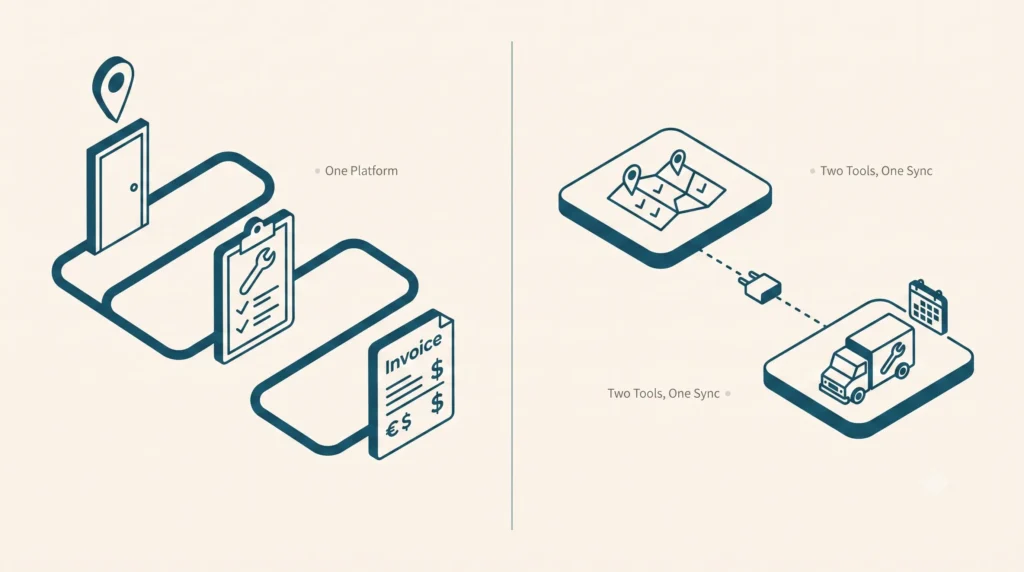
If your “all-in-one” platform needs an integration to move a lead into a job, it isn’t all-in-one. It’s two products with a shared login page.

It s 4:45 PM on a Friday. Your office manager is still at her desk, copy-pasting a customer s name, address, and job notes from your canvassing app into your scheduling tool by hand because the two systems don t actually talk to each other; they just email a spreadsheet back and forth once a night.

If your “all-in-one” platform needs an integration to move a lead into a job, it isn’t an all-in-one. It’s two products with a shared login page. “All-in-one” has become the most overused phrase in field service and sales software marketing and the least verified.

Almost every vendor claims it. Almost none mean it the same way. This guide gives you a reliable way to spot the difference before you sign a contract, rather than after you’ve migrated your data twice.

Table of Contents

  1. What “All-In-One” Actually Means (And What Most Vendors Mean By It)
  2. The 3-Question Test to Spot a Fake All-In-One
  3. Sales-First vs. Service-First: Two Flavors of the Same Bolt-On Problem
  4. What a Truly Connected Workflow Actually Looks Like
  5. Common Mistakes Buyers Make When Evaluating “All-In-One” Claims
  6. Frequently Asked Questions

What “All-In-One” Actually Means (And What Most Vendors Mean By It)

There are two completely different things hiding under one marketing phrase.

  1. “Marketing” All-In-One: A vendor got really good at one half of the job either running a door-knocking team or running a dispatch board and then acquired, partnered with, or bolted on something to cover the other half. It looks seamless in a 20-minute sales demo. In real life, it relies on a nightly batch sync, a Zapier connection, or an integration your team has to babysit.
  2. True All-In-One: One login, one monthly bill, and one support line if something breaks. The lead your rep captured at the door on Tuesday and the job ticket your dispatcher opens on Thursday are the exact same database record not two files sync’d together across platforms

We call the cost of running the second kind the Duct-Tape Tax the hidden toll of redundant subscriptions, duplicate data entry, and manual record reconciliation. On average, growing field operations lose 12 to 15 hours per week in administrative friction and pay an extra $800 $1,500/month in overlapping seat licenses.

The tell isn’t in the sales deck. It’s in what happens the exact moment a prospect turns into a scheduled job.

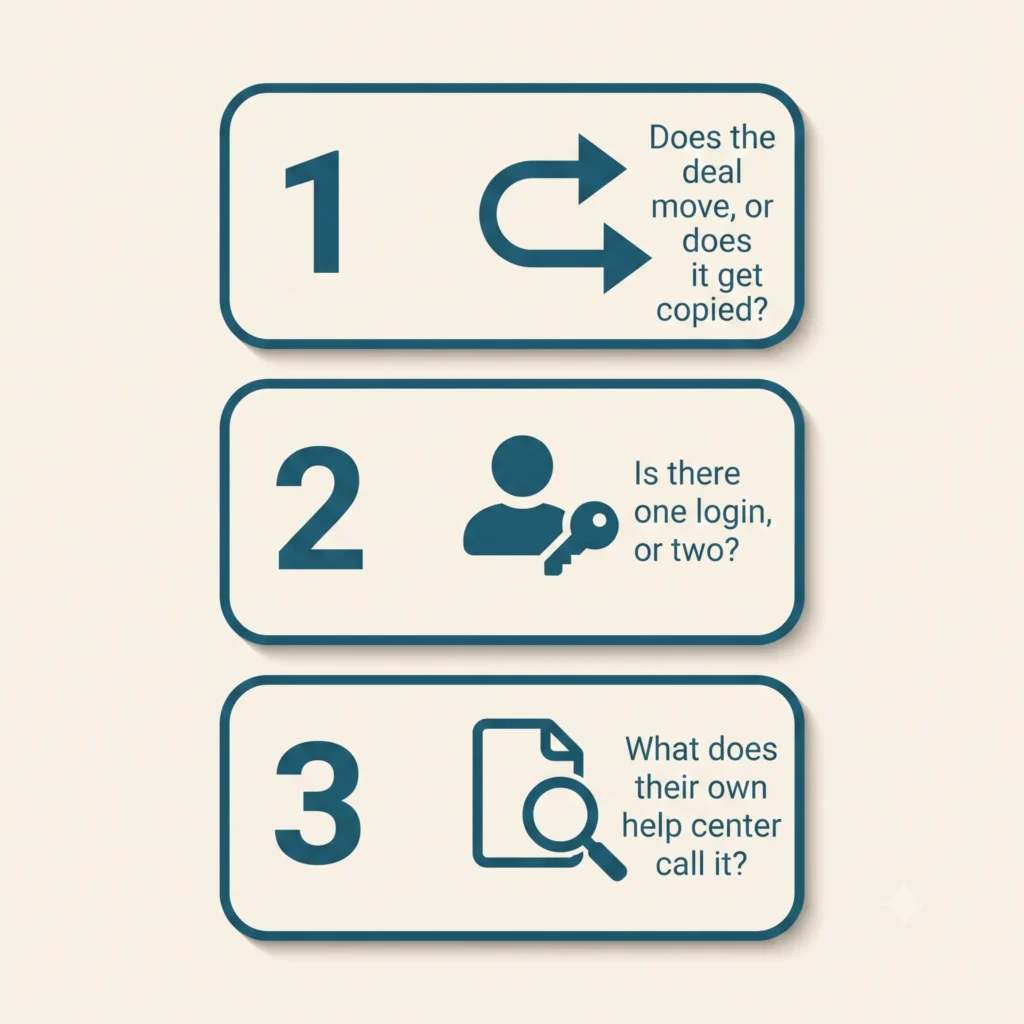
The 3-Question Test to Spot a Fake All-In-One

Ask these on the sales call, not after you’ve signed. A vendor running one real system will answer all three straight, no hedging.

1. Does the deal move, or does it get copied?

Ask them: “When my rep closes a deal at the door, does that exact same profile turn into my job ticket, or does the system just copy the data over to a new record?” If their answer includes the word “sync” or “Zapier,” you’ve caught a fake all-in-one.

In a real one-system platform, that lead doesn’t get copied anywhere it just changes status, from “lead” to “scheduled job,” with the same name, address, and notes still attached. In a bolted-together stack, a brand new record gets created in the other app, filled in with whatever fields the integration bothered to grab. Usually not all of them.

2. Is there one unified login, or two?

Ask them: “Can the same person log into one app and see both the sales pipeline and today’s job schedule or does my rep need one login and my dispatcher need a different one?” If your canvassing team and your service team are logging into two different apps with two different support numbers, you’ve got two products wearing one company’s logo.

3. What does their own help center call it?

Here’s a trick that takes thirty seconds: pull up the vendor’s help center or “integrations” page while you’re still on the call. If dispatching or scheduling shows up under “Integrations & Partners” instead of “Features,” they just told you the truth in the fine print, even if their homepage says something else.

Run this test against any platform you’re evaluating including us. We’ll cover exactly how Knockio holds up against specific competitors next, with sourced comparisons, not just claims.

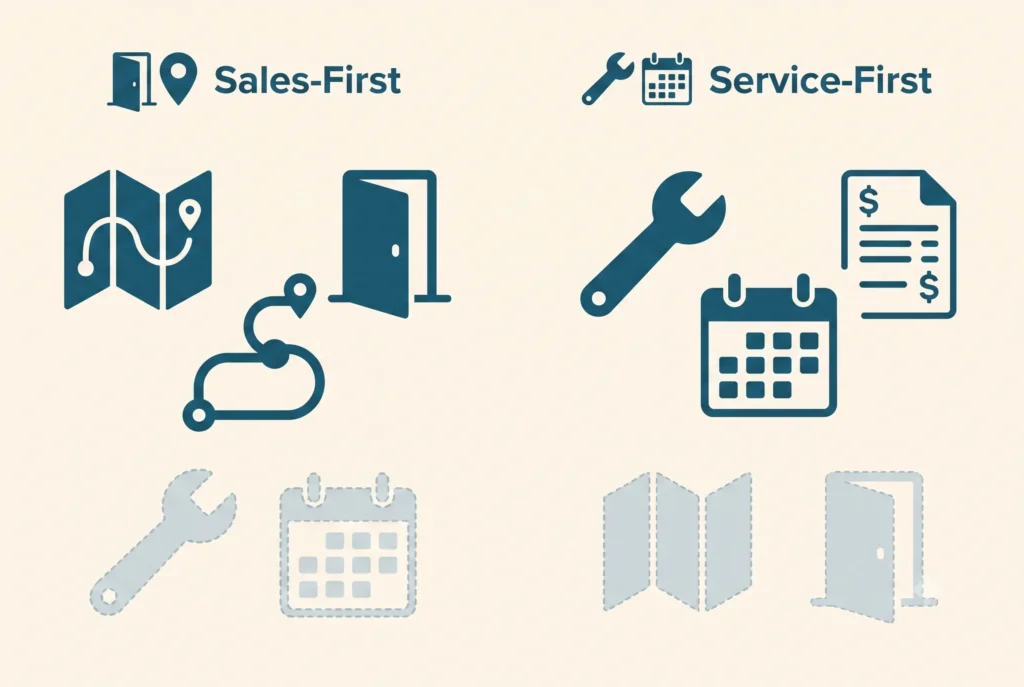
Sales-First vs. Service-First: Two Flavors of the Same Bolt-On Problem

Once you start looking for it, the pattern splits into two camps.

Sales-first platforms are genuinely great at the map, the routes, and tracking who knocked which door, because that’s the entire product. Dispatching a crew, tracking a job to completion, and cutting an invoice get bolted on later, usually through a partner integration that can’t really handle a busy Tuesday. It works fine right up until that closed deal needs a technician on-site with the right parts.

Service-first platforms are the flip side. They’re excellent at scheduling, dispatch, and invoicing for work that’s already booked, because that’s what they were built for. But ask them to run outbound sales and there’s nothing there: no territory assignment, no door-knocking map, no way to see how many doors a rep knocked today. Some bolt on a few CRM fields and call it “sales-ready.” A few text fields aren’t a canvassing engine.

We don’t blame either kind of company for this. Building a genuinely good canvassing map is hard. Building a genuinely good dispatch board is hard. Most software companies only get really good at one so they build a bridge to the other and put an “all-in-one” sticker on the homepage. It’s not a scam. It’s just not what the label promises.

“All-in-one” should mean neither half was an afterthought. In a bolted-together stack, one half always is.

What a Truly Connected Workflow Actually Looks Like

Here’s what that actually looks like on a Tuesday, without a single third-party plugin stitching it together:

  1. A rep knocks a door and logs a lead on the territory map, GPS-stamped, assigned to that rep’s route.
  2. The homeowner says yes. The same record no export, no re-entry becomes a scheduled job.
  3. A crew gets dispatched to that exact address, with the lead’s notes, photos, and pricing conversation already attached.
  4. The job is completed, an estimate or invoice is generated from the same record, and payment is collected.
  5. One support line, one login, one company, if anything breaks.

That’s how Knockio actually works: canvassing and field service running as one connected system, not two apps stitched together with a sync job. The lead your rep captured on the map Tuesday morning is the exact same file your dispatcher opens Tuesday afternoon because it never left the system it started in.

This isn’t a claim you have to take on faith. It’s the same reason we can publish pricing that scales with users, not with the number of tools you’re stitching together because there’s only one tool.

Common Mistakes Buyers Make When Evaluating “All-In-One” Claims

Trusting the word “integrated” at face value. Every vendor’s marketing page uses this word. It means nothing on its own “integrated” can describe something genuinely built into the product, or a Zapier connection held together with hope. Ask which one it is.

Not asking what breaks if you cancel one “module.” If a platform is genuinely one product, there’s no such thing as canceling half of it. Ask: “What happens to my service scheduling if I downgrade my sales seats?” If the honest answer involves a separate contract or a separate app, that’s your tell.

Assuming one brand name means one system. Plenty of software companies grew by acquisition. The acquired product often keeps its own database, its own mobile app, and its own support team for years after the deal closes sometimes permanently. A shared logo on the homepage isn’t proof the two products were ever actually merged.

Skipping the trial for the workflow that matters most. Most buyers demo the half of the product they already know they need (sales teams demo the canvassing map; service teams demo the dispatch board) and take the other half’s existence on faith. Demo the handoff specifically: convert a test lead into a test job and watch what actually happens to the data.

Next Steps

If you’re currently running a canvassing tool and a field service CRM as two separate logins, you’re already paying the Duct-Tape Tax whether or not you’ve priced it out. Compare what a single-backend platform looks like on our comparisons hub, or book a demo and ask us the same three questions this post just gave you we’ll show you the handoff live, not in a slide.

FAQ

What does “all-in-one” actually mean in sales and service software?
Genuinely, it means one company, one login, and one bill cover both the sales/canvassing side and the field-service/dispatch side, with nothing connecting separate systems behind the scenes. In practice, a lot of vendors use the phrase to describe two connected products instead of one real one.

How can I tell if a platform is really unified or just well-integrated?
Ask what happens to a lead’s data when it converts to a job: does the same record move forward, or does a new record get created in a second system via sync or API? Also check whether users need separate logins for the sales and service sides, and whether the vendor’s own documentation lists the other half as a “feature” or an “integration.”

Does switching from separate tools to one platform actually save money?
Usually, yes beyond the second subscription fee, separate tools mean duplicate data entry, two support contracts, and staff time spent reconciling records between systems. We break down the specific cost categories in The Real Cost of Separate Canvassing & Field Service Software.

Is a platform still “all-in-one” if it was built by combining two acquired products?
Not necessarily. Sometimes the acquired product gets folded into one real system over time but plenty stay as two separate apps running side by side indefinitely, just sharing a logo. Ask whether the two products have actually been merged, not just rebranded.

Can a sales-focused canvassing app ever be a real substitute for field service management software?
Only if it natively supports scheduling, dispatch, and invoicing for completed work not just lead capture. If those functions live in a separate connected app, it’s a canvassing tool with a service integration, not field service software.

Syed Junaid

Written by

Syed Junaid

Marketing Lead & Content Strategist at Knockio

Syed Junaid is the Marketing Lead & Content Strategist at Knockio, where he helps field sales and service businesses eliminate software bloat and scale their operations. He writes about B2B SaaS growth, field sales strategies, and how contractors can eliminate the “Duct-Tape Tax” to run more profitable businesses.
The “Duct-Tape Tax”: The Real Cost of Running Separate Canvassing and Field Service Software

The “Duct-Tape Tax”: The Real Cost of Running Separate Canvassing and Field Service Software

If you are running a growing home-service business in roofing, solar, HVAC, or pest control, take a look at your monthly software billing statements.

Chances are, you are paying somewhere around $20 to $45 per user each month for an outside sales or door-knocking app to hunt for leads. Then, you turn around and pay another $13 to $65 per user each month for a traditional field service CRM to schedule crews, handle dispatching, and run invoices.

Call it the “Duct-Tape Tax”, the financial and functional price businesses pay for forcing disconnected point solutions to talk to one another.

Recent SaaS management industry data shows the average company now runs upwards of 100 separate software applications. Separately, a 2022 Harvard Business Review study by Rohan Narayana Murty, Sandeep Dadlani, and Rajath B. Das, tracking 20 teams and 137 users across three Fortune 500 companies, found employees toggled between apps roughly 1,200 times per day, burning nearly four hours a week, or about 9% of the work week, just re-orienting themselves after each switch. This constant back-and-forth context switching doesn’t just create mental fatigue; it bleeds hours of field productivity and leads to costly double data entry.

For a field operation, the gap between your outside sales maps and your back-office scheduling calendar is exactly where revenue goes to die. Let’s break down the hidden costs of managing a fragmented tech stack, what a truly unified workflow looks like on a single platform for field sales and field service, the math behind consolidating your operations, and a resource-efficiency upside that’s easy to overlook.

1. The Real Cost of a Broken Sales-to-Service Handoff

When your front-end sales team uses one software system and your back-office operations team uses another, your business relies on manual workflows disguised as automation. This friction typically causes three major operational bottlenecks:

The Double Data Entry Drain

When a door-to-door sales rep successfully drops a pin, captures a lead’s information, and secures a signed inspection agreement on a doorstep, that data sits trapped in the sales app. To get a technician out to the property, an office manager must manually copy and paste the customer’s name, phone number, address, and job notes into a separate dispatching tool. This mechanical transfer wastes hours of administrative time and introduces human error into your customer database.

The Communication “Dead Zone”

Outside sales reps move fast. They often make scheduling promises at the door based on what they think crew availability looks like. But because their canvassing tool is completely blind to the real-time scheduling grid of the service technicians, they routinely overpromise. The result? Frustrated dispatchers, rescheduled appointments, and a poor customer experience before the actual job even starts.

Broken Field Visibility

Managers suffer when data is split across silos. You cannot easily see your true Customer Acquisition Cost (CAC) or evaluate team performance when lead tracking lives in App A, but final invoice revenue and job costs live in App B. You are left trying to splice together CSV exports just to see if a specific neighborhood campaign was actually profitable.

2. The Ideal Connected Workflow: From First Knock to Final Invoice

True efficiency happens when your data layer is entirely unified. When your front-end hunting tools and your back-office farming tools share the exact same system of record, instead of living in two separate products the handoff between sales and service stops being a manual process altogether.

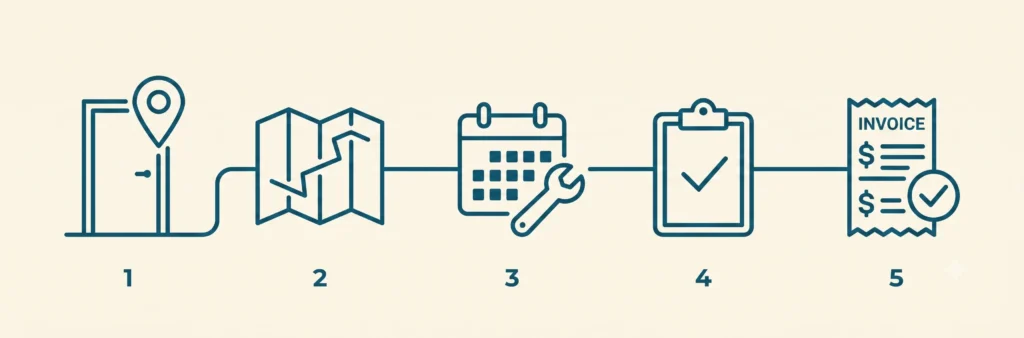
  1. Sales Rep Knocks & Captures Lead: instant internal handoff, no sync tools needed
  2. Office Manager Dispatches Tech Crew: real-time mobile execution
  3. Technician Services Property & Invoices On-Site

Here is how a connected field platform streamlines your daily operations:

Step 1: Smart Canvassing, Territory Management, and Turf Control

Your sales reps open a high-performance door-to-door canvassing app directly on their mobile devices. Managers use built-in territory management to cut clear boundaries on a map so reps never double-knock the same turf. As reps walk the neighborhood, they drop customized pins with single-tap dispositions (Not Home, Interested, Callback), building a location-verified database of the neighborhood in real time.

Step 2: Frictionless Office Dispatching

The moment a property owner agrees to an estimate or an inspection, the sales rep changes the lead status. Because the database is shared, this update triggers an alert on the office dashboard. The administrative team running field service management from the same system, instantly views the job details and uses a drag-and-drop calendar with route optimization to assign the nearest technician. There is no waiting for a daily sync, no manual re-typing, and zero communication delay.

Step 3: On-Site Service and Instant Cash Flow

The field technician receives the work order, routing navigation, and complete customer history directly on their native mobile application. After finishing the service, the technician attaches proof-of-work photos, generates a clean digital invoice, and processes the customer’s payment on-site. The invoice data flows directly back into your company’s pipeline metrics, automatically marking the original map pin as a closed, paid account.

3. The Math: How Consolidation Saves Thousands

Relying on multiple specialized point solutions might seem reasonable when looking at a single subscription fee, but the integrated cost compounds quickly. Beyond subscription creep, businesses end up paying for data-sync tooling, a multi-user Zapier plan alone runs roughly $69–$104/mo just to keep their platforms syncing with each other.

Published pricing across the category varies by vendor and plan tier, but here’s the shape of the math for a growing field service company with a 10-user team, using typical published ranges rather than any single vendor’s list price:

Software Layer Fragmented Tool Approach (typical range, 10 users) Unified Platform
Sales / Canvassing App ~$20–$45/mo per user (~$200–$450) Included
Field Service CRM & Dispatch ~$13–$65/mo per user (~$130–$650) Included
Data Sync / Webhook Fees ~$69–$104/mo (e.g. a multi-user Zapier plan) $0 (native database)
Total Monthly Software Bill roughly $400–$1,200/month Single bundled rate
Annual Technology Cost roughly $4,800–$14,400/year Single bundled rate

This is a framework for running your own numbers, not a quote. Check current published pricing for the specific tools in your stack before budgeting against it. Even at the low end of this range, a 10-user team is paying several hundred dollars a month minimum for two systems that don’t talk to each other, climbing well into four figures at typical mid-market pricing before counting the administrative hours lost to manual data entry or the leads that fall through the sales-to-service handoff.

4. The Overlooked Efficiency Win: Less Windshield Time, Less Idle Software

Consolidation has a resource-efficiency angle too, smaller than the cost and productivity story above, but real, and worth knowing if sustainability factors into your buying decision at all.

Fewer Duplicate Trips

When a canvasser’s territory boundaries and a technician’s dispatch route are pulled from the same shared map instead of two disconnected systems each guessing independently, you cut out the driving caused by overlap and manual re-routing. Industry data on route optimization software is consistent on direction, even if the exact figure varies by fleet: reported gains include up to 15% lower emissions, up to 25% less fuel used, and up to 30% shorter total distance traveled, with even a 10% cut in daily mileage adding up to thousands of kilometers a year for a moving fleet. Since transportation already accounts for roughly a quarter of global CO2 emissions, trimming redundant driving in canvassing and dispatch routes is a legitimate, if modest, lever and it’s a direct byproduct of sales and service sharing one map instead of two.

Fewer Idle Licenses

There’s a second, smaller factor: unused software carries an energy cost, not just a billing cost. SaaS benchmarking data from Vertice found that 51% of applications across the average organization are underutilized, teams paying for licenses they use less than half of and 15% go completely unused. Every one of those idle seats still runs on live server infrastructure. The IEA’s 2026 “Energy and AI” report estimates data centres consumed roughly 415 TWh of electricity in 2024 (about 1.5% of global electricity demand), on track to nearly double to around 945 TWh by 2030. Consolidating onto one fully-used platform instead of several partially-used ones won’t move that macro trend by itself, but it’s a real, measurable piece of the same “cut the digital waste” logic behind the broader SaaS-consolidation conversation.

5. Frequently Asked Questions

Do I need separate field sales software and field service management software?

Not necessarily. Field sales/canvassing software and field service management (FSM) software solve different problems one supports reps before the sale, the other runs scheduling and dispatch after it but they don’t have to live in two different products, and you don’t have to adopt both at once. Knockio offers three plans on its pricing page: Prospect for field sales and door-to-door canvassing alone, Organize for field service CRM alone, and Growth for both combined on one shared system of record, so a sales-only team, a service-only team, and a business running both can each start on the plan that actually matches how they operate.

How much more does it cost to run canvassing and field service software as separate tools instead of one platform?

The gap is real. As a rough framework: standalone canvassing/door-knocking apps typically run $20–$45/user/month, standalone field service CRMs typically run $13–$65/user/month, and that’s before adding any sync or integration tooling to connect them, see the full 10-user breakdown above. A combined platform replaces all of that with a single bundled rate; check Knockio’s current pricing for an exact quote.

Does consolidating field sales and field service software actually help reduce environmental impact?

There’s credible research behind two specific mechanisms: eliminating duplicate or unoptimized driving through shared route and territory data (route optimization studies report fuel and mileage reductions roughly in the 10–30% range), and reducing “shelfware” the roughly half of SaaS licenses that go underused industry-wide while still consuming live server capacity. Neither effect is dramatic for a single business acting alone, but both are real, measurable, and additive to the cost and productivity case for consolidation.

Conclusion: Stop Managing Tools, Start Running a System

Modern field service businesses cannot afford to let operational friction slow down their momentum. If your sales team maps territories in one app while your technicians operate out of another, you are losing money to manual work, app fatigue, and data fragmentation.

Software should simplify your business, not complicate your bookkeeping. By moving to a comprehensive field service CRM that features built-in, location-verified canvassing tools, you bridge the gap between sales generation and operational execution.

Knockio was built around exactly this workflow. Start with Prospect to run your outside sales team on its own, start with Organize to run scheduling and dispatch on its own, or go with Growth to run both together on one shared system of record so a knock at the door and a job on the calendar are never more than one click apart. Book a free demo to see it in action, or get started now with a plan and see how simple field operations become when your sales maps talk directly to your service calendar.

Sources

  1. Murty, R. N., Dadlani, S., & Das, R. B. (2022, August 22). How Much Time and Energy Do We Waste Toggling Between Applications? Harvard Business Review.
  2. BetterCloud. The Big List of 2026 SaaS Statistics State of SaaSOps data on average applications per company.
  3. NextBillion.ai. How Route Optimization Can Help Companies Cut CO2 Emissions
  4. Vertice. SaaS Wastage: The Cost of Shelfware & Underutilized Software
  5. International Energy Agency. Energy Demand from AI Energy and AI (2025 special report; data centre electricity consumption figures for 2024 and projected 2030).
Syed Junaid

Written by

Syed Junaid

Marketing Lead & Content Strategist at Knockio

Syed Junaid is the Marketing Lead & Content Strategist at Knockio, where he helps field sales and service businesses eliminate software bloat and scale their operations. He writes about B2B SaaS growth, field sales strategies, and how contractors can eliminate the “Duct-Tape Tax” to run more profitable businesses.
16 Tips to Persuade Someone to Buy Something


The biggest sales problem is to persuade someone or convince customers to buy your product and service. This is why the sales field is not for everyone. Businesses that focus on sales always succeed. Because your product and service quality do not matter if you or your team have no selling skills.

Having said that we are going to discuss the art of persuading customers to buy your product or services. Selling things to customers by winning their confidence is complex especially when your business depends on door to door canvassing.

Persuasion is a crucial skill in the world of sales. The key lies in understanding the buyer’s perspective and effectively communicating the value of your product or service. In this guide, we’ll explore various strategies and techniques to help you persuade potential customers to buy.

1. Understand the Customer

To effectively persuade someone, you must first understand their needs. Engage in active listening and ask open-ended questions to uncover their pain points and desires. Then you can pitch according to their needs.

Listen more speak less:

If you are a good listener and good at asking questions then you are on the right way. Show your interest in the customer’s pain. Ask related questions for instance, if you are selling a roofing service then you can ask about the area of the house.

2. Build Trust In Front of Customers

First impressions are everything. When you meet someone who might want to buy from you, it’s important to make them trust you. Start by looking professional, show that you really know your product, and share real stories from happy customers. People are more likely to buy from someone they think is smart and trustworthy.

3. Help Customers Like You Would Help Yourself

If you want to get someone to show interest in your product then think like them. This involves genuinely caring about your customer’s opinions and thoughts. By doing so, you gain a deeper understanding of their perspective, including the problems and suggestions they tell you. The solutions they discuss, and what’s important to them. This insight helps you connect with and be better liked by your customers.

People tend to like others who share similarities with them and, therefore find similar interests. Research shows that people are more inclined toward individuals with something in common. Whether it’s a school, hobby, mutual friends, past employers, nationality, or even a first name, identifying these connections makes persuading and building rapport with others easier.

4. Pitch in Simple Language

One of the salespeople’s biggest mistakes when pitching their service or product to customers is overcomplicating their pitch. They often assume that this is how the customer will be impressed, preferring complex ideas and complex offerings. This is a misunderstanding. Remember that complicated presentation can be harmful, as our brains naturally prefer simplicity. A great customer presentation should be straightforward for your audience to understand.

In our experience, presentation is easy and best. One can fill a presentation with bullet points, but it takes real skill and experience to convince customers using just a few words and clear diagrams.

5. Explore Customer Well-Being.

To convince people to buy your product, start the conversation by first introducing yourself and asking the customer how he is doing or how everything is going in his life.

Research shows that asking customers about their well-being leads to a significant increase in sales. It also sets a positive tone for the conversation and helps increase your sales. For example, an experiment conducted with waiters showed that the waiter who inquired about the customer’s well-being received a higher tip. This method is also very effective in door-to-door sales.

6. Use Your Client’s Name During the Conversation.

Ask for and try to remember your client’s name early in the conversation and use it from time to time during your conversation. Research shows that people enjoy hearing their own names and are more likely to form friendships when their name is used.

In some languages, you can easily address your customers by name without worrying about making a mistake. However, in some languages, it is more complicated.

To avoid any discomfort, ask your client if they are comfortable being addressed by their name. This point prevents any unpleasant situation from happening.

If you prefer not to risk offending the client, you can always use formal titles such as “Mr.” or “Miss.”. Sometimes this can encourage customers to buy your product. Also treat them like people, not just a lead.

7. Smartly Compare Your Product with Competitors

It’s important to talk about the good things your company’s product or service offers.

Sometimes, customers call to ask questions and compare products. When you get the chance, make sure to point out why your product is better. For example, it might have special features, be more customizable, or work better than what others offer. You can also mention if it’s cheaper—maybe it costs 20% less!

If your product isn’t cheaper, it’s a bit trickier. But you can explain that even if it costs a little more, the customer is getting a better product for the extra money.

8. Keep the Conversation Going.

Take the lead and start talking, ask open-ended questions, involve your customer in each step, and give the customer a chance to share more.

If you’re not sure how to involve a customer. Try this, instead of saying, “Our product has this feature,” you could say, “It can solve your problem” (ask the problem, smartly anytime throughout the conversation).”

9. Work on Emotions.

We like to believe we make decisions based on facts, but the truth is, our emotions play a big role in conversation.

When talking to a customer, focus on the feelings of your customers. Tracking your communication skills will help you connect with how they feel to keep the conversation flowing. You’ll find this works better than just giving logical reasons. Sometimes face reading can give you an advantage.

10. Persuade by Showing You Have a Clear Plan to Create Value.

When you’re selling a product or idea, think of it like going on a journey. Every journey needs a good plan to be successful. A good plan includes:

  1. Knowing where you want to end up
  2. Understanding the first steps you need to take
  3. Thinking about challenges you might face
  4. Having checkpoints to see if you’re on track
  5. What is your backup plan if needed

If you can explain these parts of your plan clearly, it will be easier to convince customers to trust you.

11. Present Yourself as a Helpful Guide or Expert.

If you’re trying to figure out how to get customers to buy your product, here’s a tip:

Don’t pretend to be something you’re not, like a business consultant, but also don’t act like a pushy salesperson. Instead, think of yourself as a professional who represents your company.

Avoid being the salesperson who just lists products without caring about what the customer really needs. Instead, use your knowledge and experience to guide the customer. You know a lot about your industry, and you can share that knowledge to help them make the best decision.

When you see yourself as an expert, you’ll sound more confident, and your words will be more convincing. Instead of just trying to sell, focus on sharing what you know.

12. Create a Sense of Urgency with Limited-Time Offers

Using urgency or the fear of missing out (FOMO) can be a powerful way to encourage customers to buy. That’s why many brands use phrases like “available for a limited time only.” This approach works well in most cases, but it might not always be effective. Understanding customer behavior can help you use this tactic wisely.

By creating a sense of urgency, you remind customers of what they might miss out on if they don’t buy the product or service soon. You emphasize that they only have a short time to take advantage of the benefits.

13. Use Visual Aids to Help Customers Understand Your Product

Visual aids are a great way to help customers see and understand your product, no matter where they’re buying from. This is especially important if they can’t see the product in person, like when shopping online or when it’s inside a box on store shelves.

At the very least, you should have pictures of the product, and it’s even better if you show it being used. Videos that show how to use the product or highlight its important features are also helpful.

You can share these visual aids on your website and social media. If you use a tool like Knockio, you can quickly show presentations to customers. You can also add a QR code to your marketing materials or product packaging that leads to these visual aids on your website.

14. Social Proof with Reviews and Testimonials Can Help

Social proof helps build trust and makes it easier to convince new customers to try your products or services. Customer reviews and testimonials are common examples of social proof.

You can also use social proof by sharing content created by your customers and using branded hashtags on social media. Influencers can help too. For small businesses, working with micro-influencers or local influencers can be a cost-effective way to build trust.

15. Offer Incentives or Bonuses to Add Extra Value

One effective way to encourage someone to say yes is by offering extra value through incentives or bonuses. Offer discounts or freebies with your product. When customers receive a bonus, they feel appreciated, which helps create positive feelings about your brand.

Bonuses can also show customers that your offer is better than what your competitors provide. The good news is that incentives and bonuses don’t always have to be expensive. While free items and discounts are attractive, customers also appreciate smaller gestures like a personalized handwritten thank-you note or creative packaging.

16. Let Customers Decide What to Do Next

Instead of trying to push a sale at the end of your conversation, let your customers decide what they want to do next. This might sound surprising, but it helps the customer feel like they’re in charge. It also makes you seem more like a helper than just someone trying to sell something. A helper is focused on what’s best for their client, while a salesperson just wants to make a sale.

You can give your customer a few options to choose from. If you offer a service, explain the different plans they can pick. If you sell products, point out what makes each one special.


Syed Junaid

Written by

Syed Junaid

Marketing Lead & Content Strategist at Knockio

Syed Junaid is the Marketing Lead & Content Strategist at Knockio, where he helps field sales and service businesses eliminate software bloat and scale their operations. He writes about B2B SaaS growth, field sales strategies, and how contractors can eliminate the “Duct-Tape Tax” to run more profitable businesses.